

swanlab.Echarts
SwanLab provides API compatibility with pyecharts, enabling seamless recording of pyecharts charts to SwanLab for rich visualization. Click the tag below for an online demo:

Line
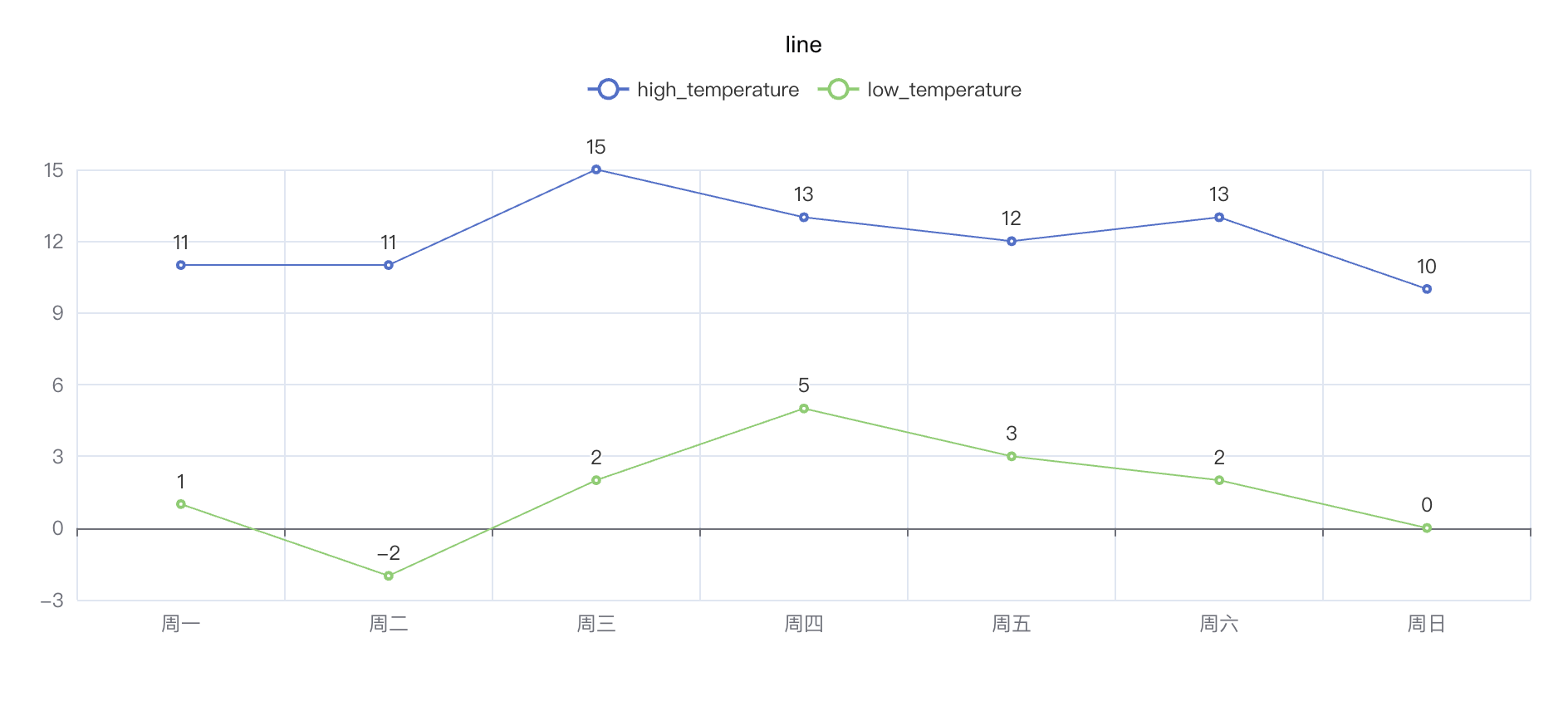
python
import swanlab

swanlab.init(project="echarts-test")

# Define data
week_name_list = ["周一", "周二", "周三", "周四", "周五", "周六", "周日"]
high_temperature = [11, 11, 15, 13, 12, 13, 10]
low_temperature = [1, -2, 2, 5, 3, 2, 0]

# Create echarts line object
line = swanlab.echarts.Line()

# Set line axis
line.add_xaxis(week_name_list)
# Set line data
line.add_yaxis("high_temperature", high_temperature)
line.add_yaxis("low_temperature", low_temperature)

# Log to SwanLab
swanlab.log({"line": line})
Bar Chart
python
import swanlab

swanlab.init(project="echarts-test")

# Define data
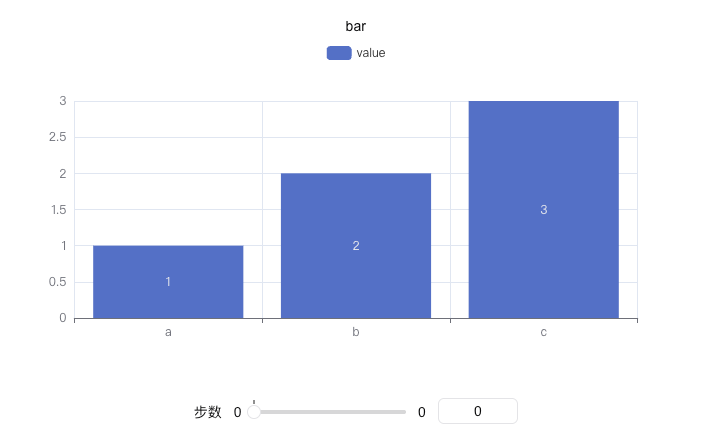
x = ["a", "b", "c"]
y = [1, 2, 3]

# Create echarts bar object
bar = swanlab.echarts.Bar()

# Set x-axis data
bar.add_xaxis(x)
# Set y-axis data
bar.add_yaxis("value", y)

# Log to SwanLab
swanlab.log({"bar": bar})
Pie Chart
python
import swanlab

swanlab.init(project="echarts-test")

# Define data
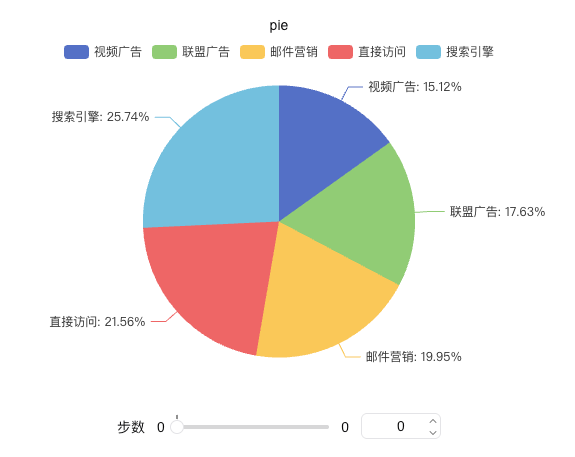
x_data = ["Direct", "Email", "Affiliate", "Video", "Search Engine"]
y_data = [335, 310, 274, 235, 400]

# Pair data
data_pair = [list(z) for z in zip(x_data, y_data)]
data_pair.sort(key=lambda x: x[1])

# Create echarts pie object
pie = swanlab.echarts.Pie()

# Set data and configure label display
pie.add(
    "Traffic Sources",
    data_pair,
    label_opts={
        "formatter": "{b}: {d}%",  # Show percentage
        "position": "outside"  # Label position
    }
)

# Log to SwanLab
swanlab.log({"pie": pie})
Heatmap
python
import swanlab

swanlab.init(project="echarts-test")

# Define data
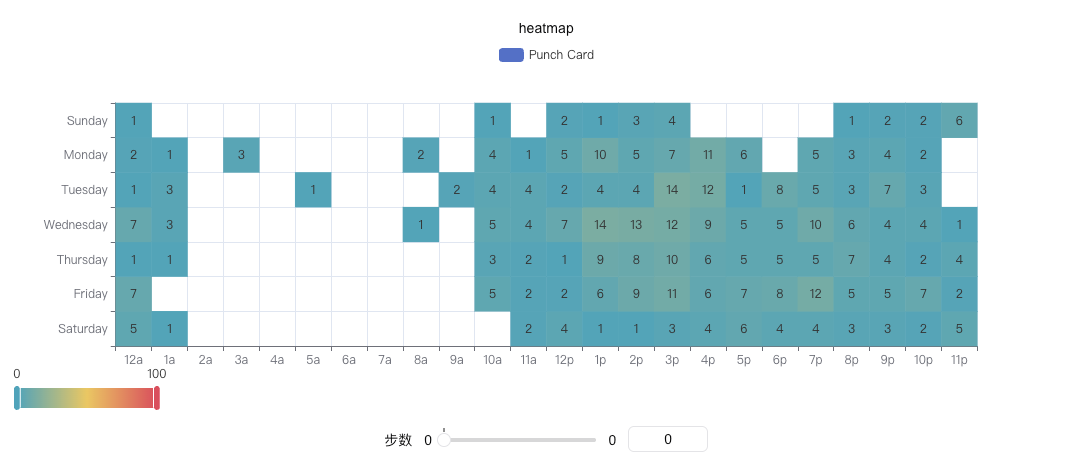
hours = ["12a", "1a", "2a", "3a", "4a", "5a", "6a", "7a", "8a", "9a", "10a", "11a",
         "12p", "1p", "2p", "3p", "4p", "5p", "6p", "7p", "8p", "9p", "10p", "11p"]
days = ["Saturday", "Friday", "Thursday", "Wednesday", "Tuesday", "Monday", "Sunday"]

data = [
    [0, 0, 5], [0, 1, 1], [0, 2, 0], [0, 3, 0], [0, 4, 0], [0, 5, 0], [0, 6, 0], [0, 7, 0],
    [0, 8, 0], [0, 9, 0], [0, 10, 0], [0, 11, 2], [0, 12, 4], [0, 13, 1], [0, 14, 1], [0, 15, 3],
    [0, 16, 4], [0, 17, 6], [0, 18, 4], [0, 19, 4], [0, 20, 3], [0, 21, 3], [0, 22, 2], [0, 23, 5],
    [1, 0, 7], [1, 1, 0], [1, 2, 0], [1, 3, 0], [1, 4, 0], [1, 5, 0], [1, 6, 0], [1, 7, 0],
    [1, 8, 0], [1, 9, 0], [1, 10, 5], [1, 11, 2], [1, 12, 2], [1, 13, 6], [1, 14, 9], [1, 15, 11],
    [1, 16, 6], [1, 17, 7], [1, 18, 8], [1, 19, 12], [1, 20, 5], [1, 21, 5], [1, 22, 7], [1, 23, 2],
    [2, 0, 1], [2, 1, 1], [2, 2, 0], [2, 3, 0], [2, 4, 0], [2, 5, 0], [2, 6, 0], [2, 7, 0],
    [2, 8, 0], [2, 9, 0], [2, 10, 3], [2, 11, 2], [2, 12, 1], [2, 13, 9], [2, 14, 8], [2, 15, 10],
    [2, 16, 6], [2, 17, 5], [2, 18, 5], [2, 19, 5], [2, 20, 7], [2, 21, 4], [2, 22, 2], [2, 23, 4],
    [3, 0, 7], [3, 1, 3], [3, 2, 0], [3, 3, 0], [3, 4, 0], [3, 5, 0], [3, 6, 0], [3, 7, 0],
    [3, 8, 1], [3, 9, 0], [3, 10, 5], [3, 11, 4], [3, 12, 7], [3, 13, 14], [3, 14, 13], [3, 15, 12],
    [3, 16, 9], [3, 17, 5], [3, 18, 5], [3, 19, 10], [3, 20, 6], [3, 21, 4], [3, 22, 4], [3, 23, 1],
    [4, 0, 1], [4, 1, 3], [4, 2, 0], [4, 3, 0], [4, 4, 0], [4, 5, 1], [4, 6, 0], [4, 7, 0],
    [4, 8, 0], [4, 9, 2], [4, 10, 4], [4, 11, 4], [4, 12, 2], [4, 13, 4], [4, 14, 4], [4, 15, 14],
    [4, 16, 12], [4, 17, 1], [4, 18, 8], [4, 19, 5], [4, 20, 3], [4, 21, 7], [4, 22, 3], [4, 23, 0],
    [5, 0, 2], [5, 1, 1], [5, 2, 0], [5, 3, 3], [5, 4, 0], [5, 5, 0], [5, 6, 0], [5, 7, 0],
    [5, 8, 2], [5, 9, 0], [5, 10, 4], [5, 11, 1], [5, 12, 5], [5, 13, 10], [5, 14, 5], [5, 15, 7],
    [5, 16, 11], [5, 17, 6], [5, 18, 0], [5, 19, 5], [5, 20, 3], [5, 21, 4], [5, 22, 2], [5, 23, 0],
    [6, 0, 1], [6, 1, 0], [6, 2, 0], [6, 3, 0], [6, 4, 0], [6, 5, 0], [6, 6, 0], [6, 7, 0],
    [6, 8, 0], [6, 9, 0], [6, 10, 1], [6, 11, 0], [6, 12, 2], [6, 13, 1], [6, 14, 3], [6, 15, 4],
    [6, 16, 0], [6, 17, 0], [6, 18, 0], [6, 19, 0], [6, 20, 1], [6, 21, 2], [6, 22, 2], [6, 23, 6],
]
data = [[d[1], d[0], d[2] or "-"] for d in data]

# Create echarts heatmap object
heatmap = swanlab.echarts.HeatMap()

# Set axis data
heatmap.add_xaxis(hours)
heatmap.add_yaxis(
    "Punch Card",
    days,
    data,
)

# Log to SwanLab
swanlab.log({"heatmap": heatmap})
Scatter Plot
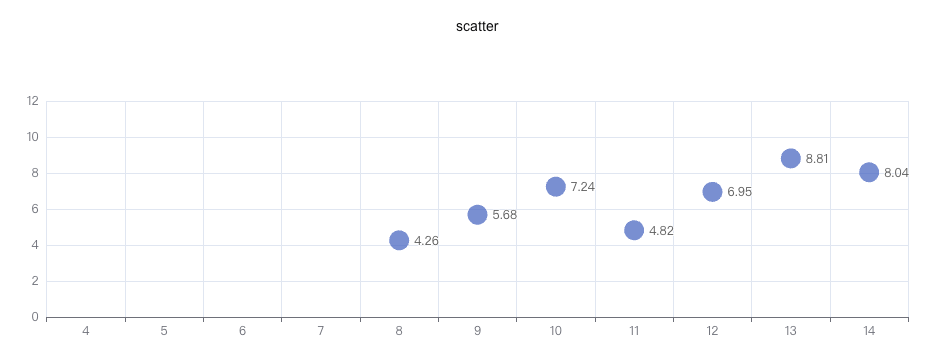
python
import swanlab

swanlab.init(project="echarts-test")

# Define data
data = [
    [10.0, 8.04],
    [8.0, 6.95],
    [13.0, 7.58],
    [9.0, 8.81],
    [11.0, 8.33],
    [14.0, 9.96],
    [6.0, 7.24],
    [4.0, 4.26],
    [12.0, 10.84],
    [7.0, 4.82],
    [5.0, 5.68],
]
data.sort(key=lambda x: x[0])
x_data = [d[0] for d in data]
y_data = [d[1] for d in data]

# Create echarts scatter object
scatter = swanlab.echarts.Scatter()

# Set data
scatter.add_xaxis(x_data)
scatter.add_yaxis(
    "",
    y_data,
    symbol_size=20,
)

# Log to SwanLab
swanlab.log({"scatter": scatter})
Radar Chart
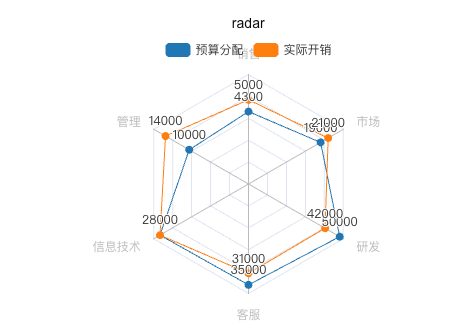
python
import swanlab

swanlab.init(project="echarts-test")

# Define data
v1 = [[4300, 10000, 28000, 35000, 50000, 19000]]
v2 = [[5000, 14000, 28000, 31000, 42000, 21000]]

# Create echarts radar object
radar = swanlab.echarts.Radar()

# Configure radar dimensions and scale
radar.add_schema(
    schema=[
        {"name": "Sales", "max": 6500},
        {"name": "Management", "max": 16000},
        {"name": "IT", "max": 30000},
        {"name": "Support", "max": 38000},
        {"name": "R&D", "max": 52000},
        {"name": "Marketing", "max": 25000},
    ]
)

# Add data series
radar.add(
    "Budget",
    v1,
    color="#1f77b4",
)

radar.add(
    "Actual",
    v2,
    color="#ff7f0e",
)

# Log to SwanLab
swanlab.log({"radar": radar})
Boxplot
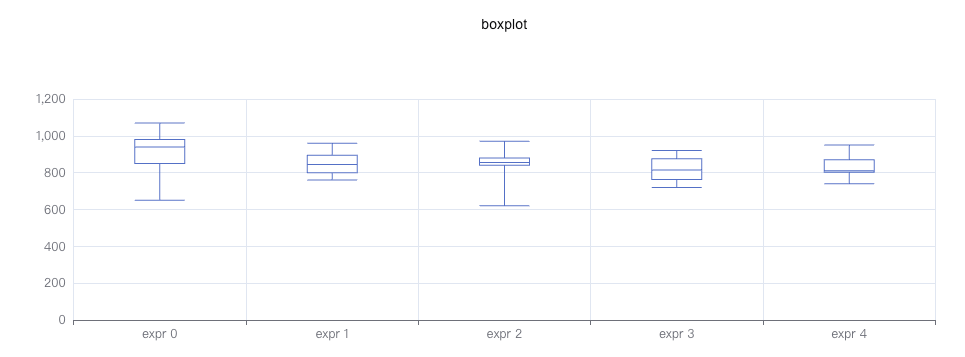
python
import swanlab

swanlab.init(project="echarts-test")

# Define data
y_data = [
    [850, 740, 900, 1070, 930, 850, 950, 980, 980, 880, 1000, 980, 930, 650, 760, 810, 1000, 1000, 960, 960],
    [960, 940, 960, 940, 880, 800, 850, 880, 900, 840, 830, 790, 810, 880, 880, 830, 800, 790, 760, 800],
    [880, 880, 880, 860, 720, 720, 620, 860, 970, 950, 880, 910, 850, 870, 840, 840, 850, 840, 840, 840],
    [890, 810, 810, 820, 800, 770, 760, 740, 750, 760, 910, 920, 890, 860, 880, 720, 840, 850, 850, 780],
    [890, 840, 780, 810, 760, 810, 790, 810, 820, 850, 870, 870, 810, 740, 810, 940, 950, 800, 810, 870],
]

# Create echarts boxplot object
boxplot = swanlab.echarts.Boxplot()

# Set data
boxplot.add_xaxis(["expr 0", "expr 1", "expr 2", "expr 3", "expr 4"])
boxplot.add_yaxis("", boxplot.prepare_data(y_data))

# Log to SwanLab
swanlab.log({"boxplot": boxplot})
Parallel
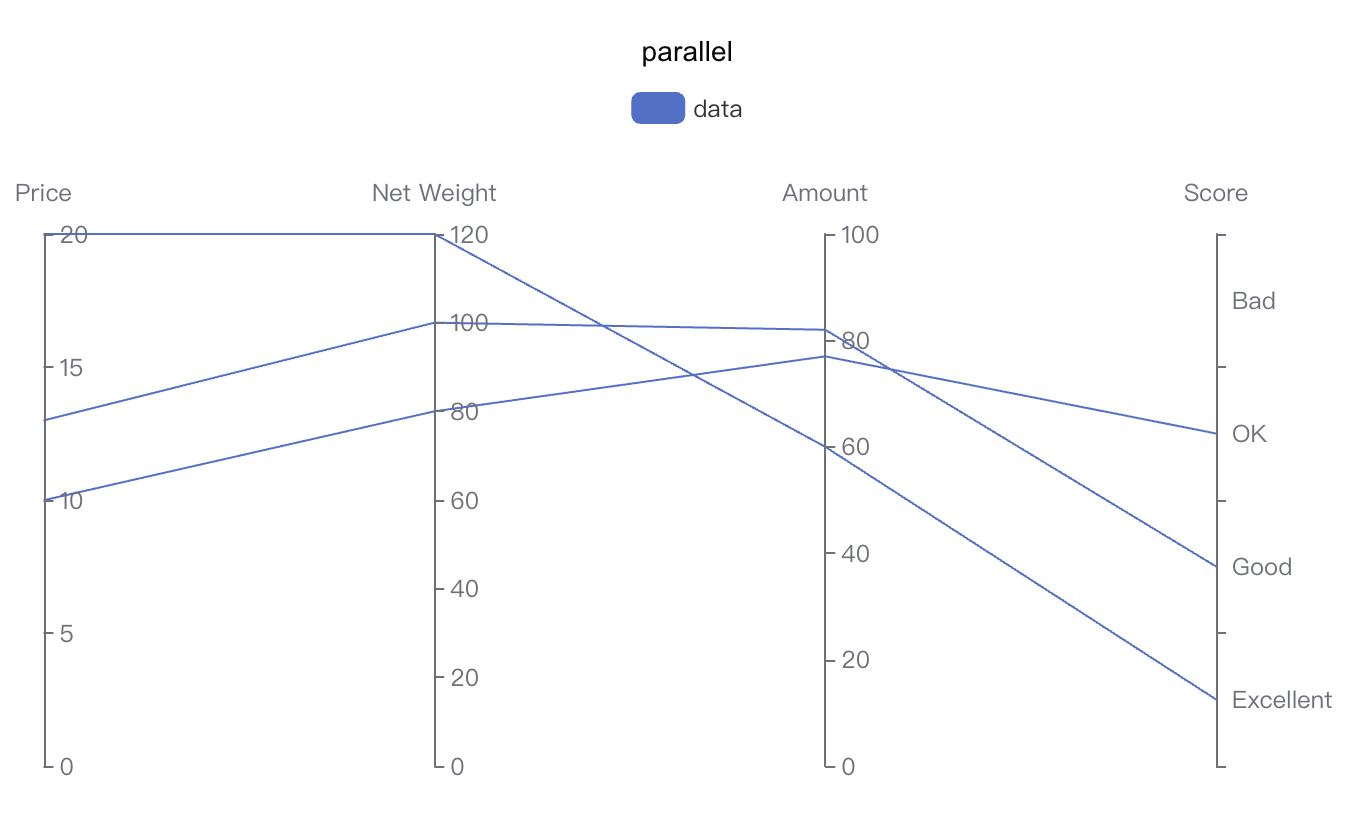
python
import swanlab

swanlab.init(project="echarts-test")

# 定义数据
parallel_axis = [
    {"dim": 0, "name": "Price"},
    {"dim": 1, "name": "Net Weight"},
    {"dim": 2, "name": "Amount"},
    {
        "dim": 3,
        "name": "Score",
        "type": "category",
        "data": ["Excellent", "Good", "OK", "Bad"],
    },
]

data = [[12.99, 100, 82, "Good"], [9.99, 80, 77, "OK"], [20, 120, 60, "Excellent"]]

# Create echarts parallel object
parallel = swanlab.echarts.Parallel()

# Set parallel axis
parallel.add_schema(parallel_axis)
# Set parallel data
parallel.add("data", data=data)

# Log to SwanLab
swanlab.log({"parallel": parallel})
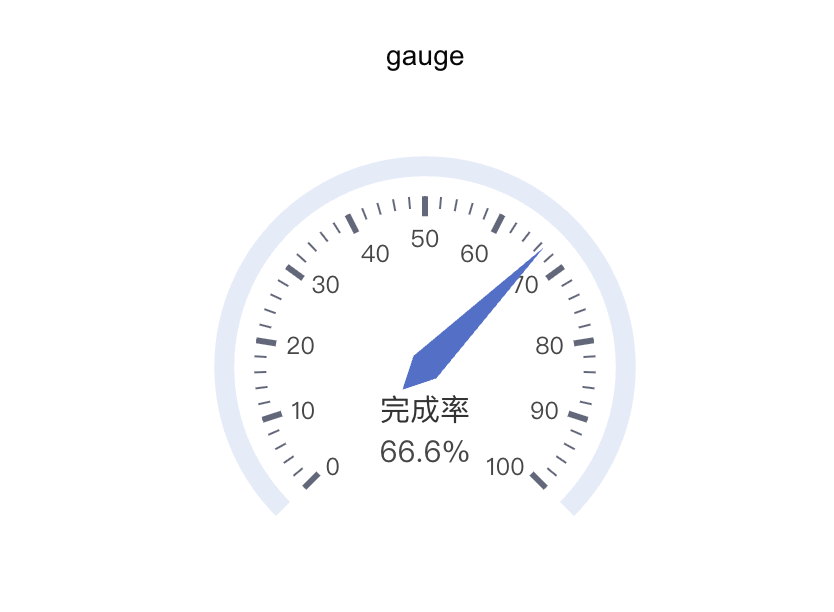
Gauge
python
import swanlab

swanlab.init(project="swanlab-echarts-demo")

# Create echarts gauge object
gauge = swanlab.echarts.Gauge()
gauge.add("", [("完成率", 66.6)])

# Log to SwanLab
swanlab.log({"gauge": gauge})
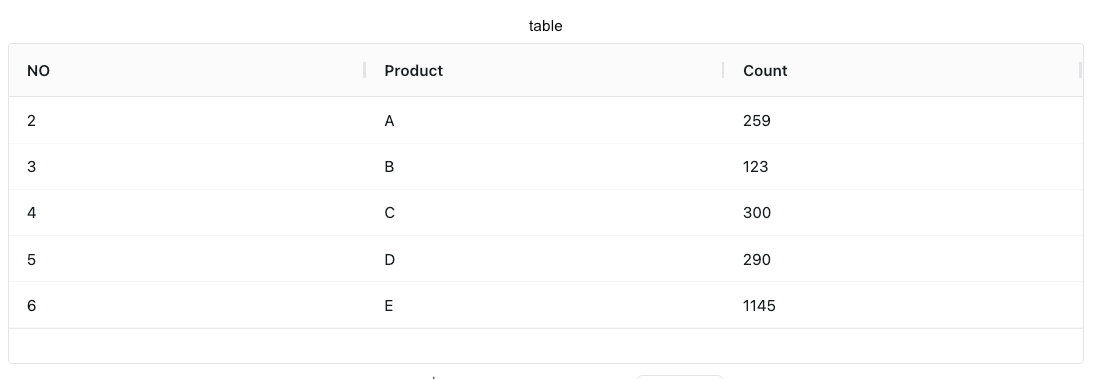
Table
python
import swanlab

swanlab.init(project="echarts-test")

# Define headers
headers = ["NO", "Product", "Count"]
# Define data
rows = [
    [2, "A", 259],
    [3, "B", 123],
    [4, "C", 300],
    [5, "D", 290],
    [6, "E", 1145],
]

# Create echarts table object
table = swanlab.echarts.Table()

# Add data
table.add(headers, rows)

# Log to SwanLab
swanlab.log({"table": table})