

⚡️Changelog
Update Guide
Upgrade to latest version: pip install -U swanlab
Github: https://github.com/SwanHubX/SwanLab
v0.10.2 - 2026.10.09
🚀 New Features
- Added the
skip_storesetting: when enabled, the SDK skips writing local log files and uploads all experiment metrics directly to the cloud. See Skipping Local Log Persistence
🔧 Bug Fixes
- Fixed an issue where
sync_wandb()was incompatible with newer versions of thewandbSDK
v0.10.1 - 2026.09.22
🚀 New Features
OpenAPI/CLInow supports a custom X-axis parameter when querying experiment metrics
🔧 Bug Fixes
- Fixed an issue where the writability probe could trigger an IO error on network file systems such as FUSE
- Fixed an issue where experiment metrics synced via
swanlab syncinofflinemode were not visible on the frontend charts
v0.10.0 - 2026.09.01
🚀 New Features
- Added the
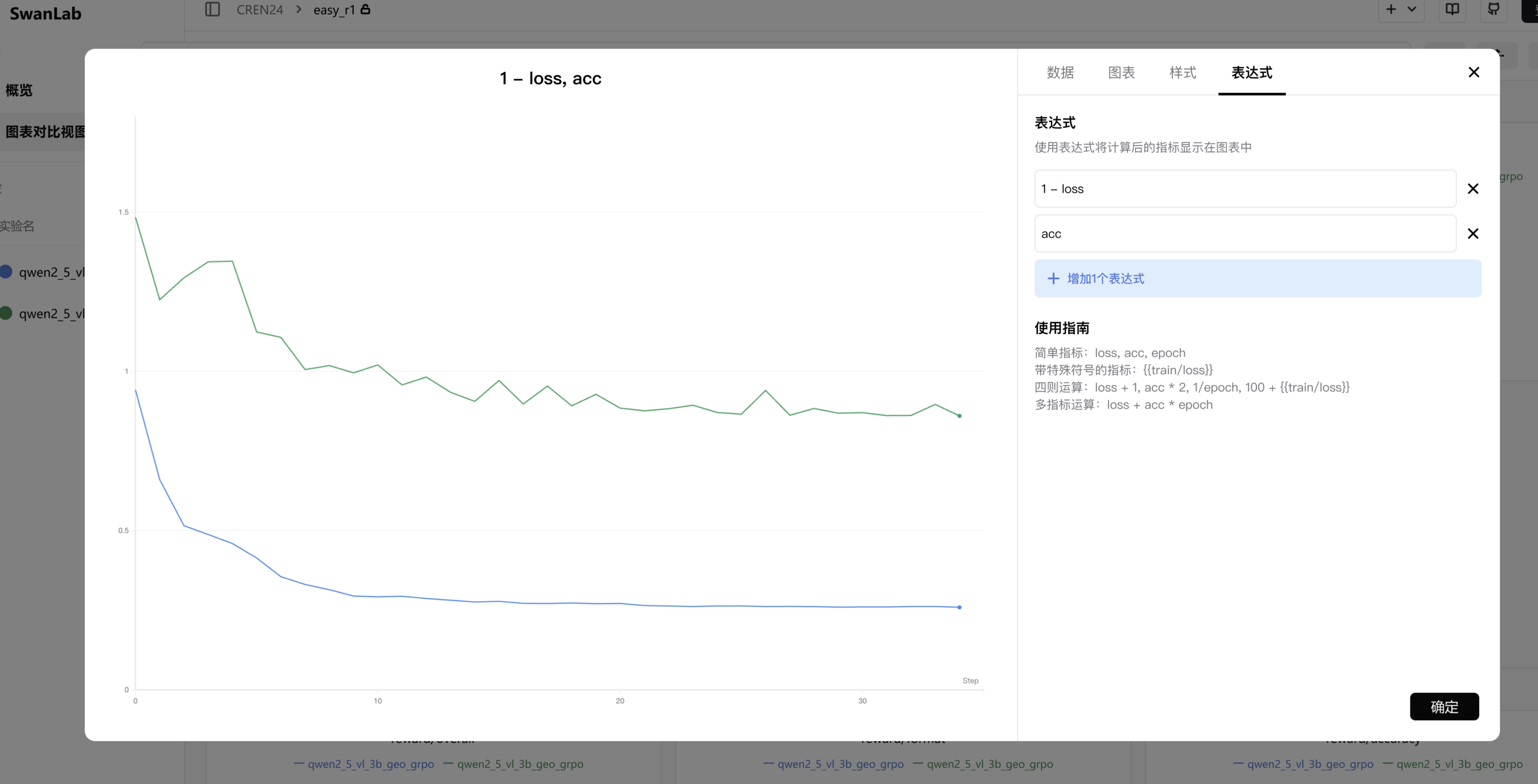
swanlab.define_metric()API to define chart behavior for metrics before logging: custom X-axis, chart grouping, and more. See swanlab.define_metric() - Added the "Metric Expression" feature, supporting computation and visualization across metrics
🔧 Bug Fixes
- Fixed an issue where users with write-only permissions encountered a 403 error during initialization when the project already existed: the SDK now queries the project first and only creates it if it does not exist
⚠️ Deprecation Notice
- Some legacy compatibility APIs now emit a
DeprecatedWarningdeprecation notice. - ⚠️ The legacy APIs remain compatible for now and will not raise errors, but they will be gradually removed in future versions. Please migrate to the new APIs as soon as possible. API mapping:
| Deprecated API | New API |
|---|---|
swanlab.roc_curve() | swanlab.echarts.roc_curve() |
swanlab.pr_curve() | swanlab.echarts.pr_curve() |
swanlab.confusion_matrix() | swanlab.echarts.confusion_matrix() |
swanlab.register_callbacks() | swanlab.merge_callbacks() |
OpenAPI experiment.column() / experiment.columns() | experiment.series() |
v0.9.8 - 2026.08.26
- Update some warning tips
v0.9.7 - 2026.08.21
🔧 Bug Fixes
- Fixed an issue where literal quotes remained in environment variables injected via shell scripts (e.g.,
eval, command substitution,/etc/environment), causing parsing failures. The SDK now automatically strips matched leading/trailing quotes (e.g.,SWANLAB_API_KEY='"abc123"'is now correctly parsed asabc123) - Fixed an issue where
OpenAPI/swanlab apiCLI failed to parse null data returned by the server
v0.9.6 - 2026.08.20
🔧 Bug Fixes
- Fixed dependency compatibility issues on certain Linux distributions. Minimum supported
glibcversion is now ≥2.17. - Fixed an issue where authentication became invalid when calling
swanlab.init()again afterswanlab.finish()in online mode. Theswanlab.finish()method now properly resets the client.
v0.9.5 - 2026.08.19
⚡️ Improvements
- Reduced SwanLab process memory usage by orders of magnitude: in large-scale, long-running training tasks, memory usage can drop to as low as 1/360 of the original (↓ 99.7%)
💥 Breaking Changes
- 📢 The next-generation backend architecture is being rolled out gradually, and some metric query APIs have breaking changes
- ⚠️ Users of
OpenAPI/SwanLab CLI/SwanLab-Skill/resume(checkpoint resumption) are strongly advised to upgrade to this version
Version Migration
This update does not affect the normal use of existing versions. We will reserve an upgrade window for everyone — please plan your version migration accordingly.
v0.9.4 - 2026.08.08
🔧 Bug Fixes
- Fixed a credential mismatch in the login flow: when switching hosts without providing a new
api_key, old credentials are no longer incorrectly reused, preventing authentication failures caused by logging into a new host with an old key
v0.9.3 - 2026.08.07
🚀 New Features
- Added detection and monitoring support for the Ascend 950 NPU
- Adjusted default constraints for experiment tags: the single-tag length limit is raised to 512 characters, and the maximum number of tags is adjusted to 30
🔧 Bug Fixes
import swanlabno longer loads configuration at import time: invalid environment variables, a corruptedswanlab.yaml, or unavailable paths no longer block the package import; configuration is now loaded and validated on first use at entry points such asinit()/login()/Api()- Fixed an issue where
web_hostwas not re-derived when onlyapi_hostwas passed tomerge_settings
v0.9.2 - 2026.07.29
🔧 Bug Fixes
- Fixed an issue where terminal log upload errors were silently swallowed, causing the transport-layer retry mechanism to fail
v0.9.1 - 2026.07.24
🔧 Bug Fixes
- Fixed a crash when initializing
Runin non-main-thread environments (e.g., Ray actors) - Fixed an issue where the default HTTP timeout did not take effect when
timeout=Nonewas explicitly passed - Fixed an issue where high-frequency disk I/O degraded data upload efficiency
v0.9.0 - 2026.07.16
🚀 New Features
- 📊 The Multi-View feature is now fully released, offering more flexible custom chart configurations
💡 How to Upgrade
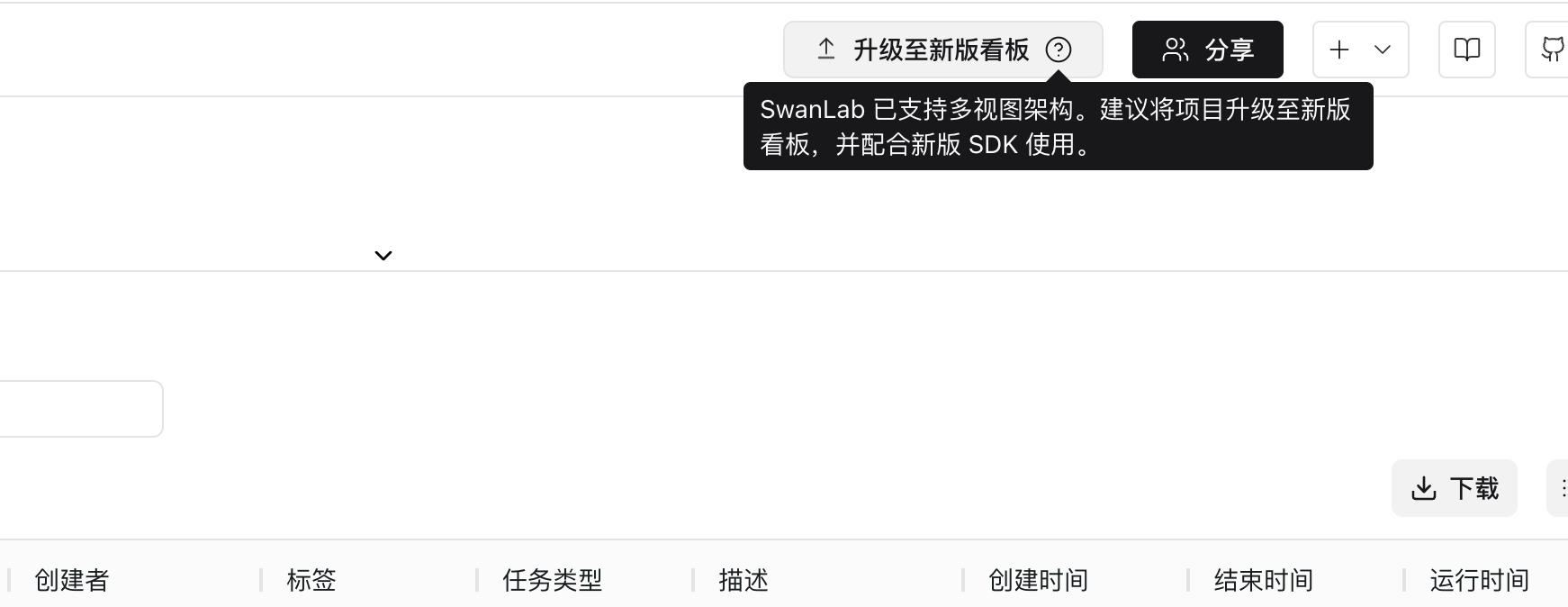
- Open the
projectyou want to upgrade and click "Upgrade to New Dashboard" in the top-right corner to complete the upgrade - ⚠️ Note:
- The upgrade duration depends on the number of experiments and charts in the project, please be patient
- Experiments in progress cannot be upgraded
- The upgrade cannot be rolled back to the old dashboard, please confirm carefully before proceeding!
💥 Breaking Changes
- 😈 The Multi-View feature requires SDK
v0.9.0+:- After upgrading a project to the new dashboard, you must upgrade the SDK to
v0.9.0+to create experiments, resume experiments, and log metrics - Projects that have not been upgraded to the new dashboard can still log metrics and create experiments with SDK versions earlier than
v0.9.0; however, SDKv0.9.0+cannot log metrics to or create experiments in projects on the old dashboard
- After upgrading a project to the new dashboard, you must upgrade the SDK to
v0.8.3 - 2026.06.16
🚀 New Features
- 🔥 Added HTML chart support, allowing embedding of pages generated by LLM Vibe Coding. See swanlab.Html()
- 🧭 Kubernetes deployment Prometheus + Grafana solution is now available. See Monitoring & Logging Configuration Guide
v0.8.0 - 2026.06.05
🚀 New Features
- ⚡️ Complete SwanLab SDK refactor, reducing training speed overhead by ~↓ 95.4% and log disk usage by ~↓ 65.1%
- 🪓 Added
swanlab pingto check network connectivity and runtime environment info - 🪓 Added
swanlab.async_log()for asynchronous metric logging - 🪓 Added
swanlab login --localcommand, improving the experience for multi-user training scenarios - 🪓 Added OpenAPI CLI support — query experiment logs directly via the
swanlab apiCLI - 🪓 SwanLab official Skill is now available: swanlab-skill, install with:
npx skills add SwanHubX/SwanLab-Skill -y -gbunx skills add SwanHubX/SwanLab-Skill -y -g- 🦄 Private deployment only: Added
swanlab.save()file save interface. Not available on the public cloud version. - 🦄 Improved error reporting in error scenarios, providing more detailed error messages
- 🔧 Added new configurable environment variables
💥 Breaking Changes
- 😈 v0.8.0 is no longer compatible with the
backup.swanlablog format from previous versions. Historical logs must be read or processed using the corresponding older versions!! - 😈 Some OpenAPI usage patterns have changed — please plan your migration accordingly
- 😈 Removed several legacy framework integrations
🔧 Bug Fixes
- 🐞 Fixed an issue where experiment startup time was excessively long in some scenarios
- 🐞 Fixed a bug where experiment colors would be duplicated in offline sync scenarios
v0.7.12 - 2026.03.19
🚀 New Features
- 🦜 Experiment Duplicate feature is now available, improving the experience of comparing baseline experiments across multiple projects
- 🪓 Parallel Mode is now available, allowing multiple distributed processes to upload metrics to the same experiment at the same time
- 🪓 Write Rate Upgrade, now SwanLab supports higher SDK metric write rates
- 🦄 resume id now supports custom characters
- 🪓 SDK supports specifying experiment color
🔧 Bug Fixes
- Fixed a bug where adding tags would cause a lag
- Fixed a series of other issues
v0.7.8 - 2026.02.06
🚀 New Features
- ⚡️ LightningBoard (Lightning Board) is now available, designed for extremely large chart scenarios like pre-training of large models
- 📊 New chart embedding link, now you can embed your charts into online documents (e.g., Notion, Feishu Cloud Docs)
- 📊 New chart pinning to first position in group
- 📊 Charts Table supports CSV download
- 🌸 Project share button moved to top header area
🔧 Bug Fixes
- Fixed issue where horizontal axis was not displayed completely when downloading chart PNG
- Fixed issue where clicking the "Apply" button in the chart configuration panel would cause a lag when the chart was zoomed in
- Fixed a series of other issues
v0.7.6 - 2026.01.06
🚀 New Features
- Added support for AMD ROCm hardware monitoring
- Added support for TianShu hardware monitoring
- Optimized SDK connection performance, improving stability
v0.7.4 - 2025.12.14
Released SwanLab Kubernetes version, deployment instructions see this document
🚀 New Features
- Adapted to SwanLab Kubernetes version
- Overview table view - supports hiding, showing, pinning, sorting, and ascending/descending columns through table headers
v0.7.3 - 2025.12.11
🚀 New Features
- Added detailed information display for line charts, when hovering over a line chart, pressing Shift will enable detailed mode, supporting display of the time of the current log point
- Grouped charts now support MIN/MAX area range display
- Added integration with NVIDIA-NeMo RL framework, Documentation
- Added integration with Telegram notification plugin, Documentation
🤔 Improvements
- Fixed network connection quality issues with the SDK
- Optimized chart loading performance
v0.7.2 - 2025.11.17
🚀 New Features
- Added X-axis data source to the global chart settings
- Added Hover mode to the global chart settings, supporting setting the hover mode for other charts when hovering over a specific line chart
- Added new environment variable:
SWANLAB_WEBHOOK_VALUE
🤔 Improvements
- Fixed some issues
v0.7.0 - 2025.11.06
🚀 New Features
- Experiment Group is now available, supporting group management for large batches of experiments
- Workspace page upgraded, supporting quick switching between multiple organizations
swanlab.initnow supportsgroupandjob_typeparameters
🤔 Improvements
- Significantly optimized chart rendering performance, allowing researchers to focus more on experimental analysis itself.
- Fixed some compatibility issues with the public API.
v0.6.12 - 2025.10.18
🚀 New Features
- Added Bark notification plugin, supporting iOS push notifications when training completes or an error occurs, Documentation
- Optimized application performance
v0.6.11 - 2025.10.15
🚀 New Features
- New project UI interface, table view supports global filtering, sorting, and other capabilities
- Line chart configuration now supports X-axis data source configuration
- Added ctrl-c to the experiment status, indicating manually interrupted experiments
- Added
swanlab local,swanlab online,swanlab offline,swanlab disabledcommands to quickly set SwanLab mode in the command line, Documentation
v0.6.9 - 2025.09.09
🚀 New Features
- Projects now support adding collaborators. Documentation
- Major upgrade to the organization management page, offering enhanced permission control and project management capabilities.
- Added new environment variables:
SWANLAB_DESCRIPTION,SWANLAB_TAGS,SWANLAB_DISABLE_GIT.
🤔 Improvements
- Enhanced chart rendering performance with low-intrusion loading animations, allowing researchers to focus more on experimental analysis itself.
- Fixed some compatibility issues with the public API.
🔌 Integrations
- Added integration with Apple's MLX LM framework. Documentation
- Added integration with SGLang's SpecForge framework.
v0.6.8 - 2025.07.29
🚀 New Features
- Sidebar now supports experiment filtering and sorting
- Table view introduces a column control panel for easy column hiding and showing
- Multiple API Key management is now available, making your data more secure
- swanlab sync now offers improved compatibility for log file integrity, adapting to scenarios such as training crashes
- New chart types released: PR Curve, ROC Curve, and Confusion Matrix
- Open API now includes an interface for retrieving experiment metrics
🤔 Improvements
- Added support for Japanese and Russian languages
- The configuration table in experiment cards now supports one-click collapse/expand
- Fixed some issues
v0.6.7 - 2025.07.17
🚀 New Features
- Added support for more flexible line chart configuration, including line type, color, thickness, grid, and legend position
- Added support for
swanlab.Videodata type, supporting recording and visualizing GIF format files - Added support for configuring the Y-axis and maximum number of experiments displayed in the global chart dashboard
⚙️ Improvements
- Increased the maximum experiment name length to 250 characters
- Fixed some issues
v0.6.5 - 2025.07.05
🚀 New Features
- Added support for resuming training from checkpoints (resume断点续训)
- Added support for zooming in on small line charts
- Added support for configuring individual chart smoothing
⚙️ Improvements
- Significantly improved interaction experience when zooming in on charts
🔌 Integrations
- 🤗 Integrated with the accelerate framework. See the documentation to enhance experiment tracking in distributed training.
- Integrated with the ROLL framework. See the documentation to improve experiment logging during distributed training.
- Integrated with the Ray framework. See the documentation to enhance experiment tracking in distributed training environments.
🔌 Plugins
- Added a new
LogdirFileWriterplugin, which supports writing files directly into the log directory.
v0.6.4 - 2025.06.18
🚀 New Features
- Added integration with AREAL, PR
- Added support for highlighting corresponding curves when hovering over experiments in the sidebar
- Added support for cross-group comparison line charts
- Enabled progressive chart rendering to improve page loading speed
- Added support for setting experiment name clipping rules
⚙️ Bug Fixes
- Fixed issues with
localmode where log files could not be correctlysynced andwatched
v0.6.3 - 2025.06.12
🚀 New Features
- Added
swanlab.echarts.tableto support creating table charts - Added MB memory recording for Ascend NPU, MetaX, Hygon DCU, Cambricon MLU, and Kunlunxin XPU hardware monitoring
swanlab syncnow supports uploading multiple log files at once- Added
Public/Privatefiltering to workspaces - Added
Latest/Max/Minswitch module to table view
v0.6.2 - 2025.06.09
🚀 New Features
- Added the
swanlab synccommand to support syncing local logs to SwanLab Cloud or private deployment - Supports storing complete experiment log files locally
v0.6.1 - 2025.06.05
🚀 New Features
- Hovering over the table header now displays a shortened name
- Added the "Expand Subtable" feature in table view
- Hardware monitoring now supports Hygon DCU
- Hardware monitoring now supports retrieving power consumption information for Ascend NPUs
🤔 Optimizations
- Improved integration with the HuggingFace Accelerate framework
- Duplicate step log warnings are no longer printed by default
v0.6.0 - 2025.06.01
🚀 New Features
- Added support for free dragging of charts
- Added ECharts custom charts, including 20+ chart types such as bar charts, pie charts, and histograms;
- Hardware monitoring now supports MetaX GPUs
- Integrated the PaddleNLP framework;
v0.5.9 - 2025.05.25
🚀 New Features
- 📒 Logging now supports standard error streams, significantly improving the logging experience for frameworks like EvalScope/PyTorch Lightning
- 💻 Hardware monitoring now supports Moore Threads GPUs
- 🔐 Added security protection for command execution logs—API Keys will now be automatically hidden
- ⚙️ Settings now include "Default Workspace" and "Default Visibility" configurations, allowing you to specify under which organization new projects are created by default!
v0.5.8 - 2025.05.13
🚀 New Features
- Added Experimental Tag feature
- Added Log Scale feature for line charts
- Added Experiment Group Drag-and-Drop feature
- Added Configuration and Metrics table download functionality in experiment cards
- Added Open API, supporting data retrieval from SwanLab via API
- Significantly optimized metric transmission performance, improving speed for handling thousands of metrics
- Integrated the
paddlenlpframework
🤔 Optimizations
- Improved a series of interactions on the personal homepage
🌍 Ecosystem
- Listed on Tencent Cloud App Marketplace: Guide
v0.5.6 - 2025.04.23
🚀 New Features
- Line charts now support chart configuration, allowing customization of X/Y axis ranges, main title, and X/Y axis titles.
- Chart search now supports regular expressions.
- SwanLab private deployment edition now supports offline activation verification.
- Added support for Kunlunxin XPU environment logging and hardware monitoring.
- Improved pip environment logging compatibility for projects using
uv. - Environment logging now records Linux distributions (e.g., Ubuntu, CentOS, Kylin, etc.).
🤔 Optimizations
- Fixed issues with the sidebar's one-click experiment hiding feature.
v0.5.5 - 2025.04.07
🚀 New Features
- Added
swanlab.Moleculedata type to support biochemical molecular visualization, providing better training experience for AI4Science tasks like AlphaFold - Experiment tables now remember your sorting, filtering, and column dragging!
- Added support for recording Cambricon MLU temperature and power metrics
- Introduced three new environment variables: SWANLAB_PROJ, SWANLAB_WORKSPACE, and SWANLAB_EXP_NAME
- Added Cambricon MLU logo display in environment information
🌍 Ecosystem
- Large model evaluation framework EvalScope has integrated SwanLab! See: https://github.com/modelscope/evalscope/pull/453
🛠 Improvements
- Optimized web page loading performance
v0.5.4 - 2025.03.31
🚀 New Features
• Added the swanlab.Settings method for more granular experiment behavior control, further enhancing openness
• Added hardware logging and resource monitoring for Cambricon MLU
• Added CANN version logging for Ascend NPU hardware records
• Added GPU architecture and CUDA core count logging for NVIDIA GPU hardware records
• NVIDIA GPU hardware monitoring now supports logging "GPU memory access time percentage"
• "Profile" page now displays your "Organization"
• "Overview" page now supports editing "Project Description" text
🤔 Improvements
• Fixed some issues with sync_wandb
• Fixed some issues with the Object3D class
• Optimized the styling of "General" settings
• Significantly improved project loading performance
🔌 Plugins
• Official plugins now include Slack Notifications and Discord Notifications, further integrating with the global ecosystem
v0.5.3 - 2025.03.20
🚀 New Features
- SwanLab has officially joined the 🤗HuggingFace ecosystem! Starting from Transformers version 4.50.0, SwanLab is officially integrated as an experiment tracking tool. Simply add
report_to="swanlab"inTrainingArgumentsto start tracking your training.
- Added
swanlab.Object3Dto support recording 3D point clouds. Docs - Hardware monitoring now supports recording GPU memory (MB), disk utilization, and network upload and download.
🤔 Optimizations
- Fixed several issues.
v0.5.0 - 2025.03.12

🎉🎉 SwanLab Self-Hosted Deployment (Community Edition) is now officially released!! Deployment Guide
🚀 New Features
- Added the
callbacksparameter toswanlab.init, allowing the registration of callback functions during initialization to support various custom plugin classes. - Introduced
swanlab.register_callback(), enabling the registration of callback functions outside ofinit. Documentation - Upgraded
swanlab.login()with new parametershost,web_host, andsave, adapting to the characteristics of self-hosted deployment services and supporting the option to not write user login credentials locally for shared server scenarios. Documentation - Upgraded
swanlab loginwith new parametershost,web_host, andapi-key. Documentation - Added support for using
swanlab.sync_mlflow()to synchronize MLflow projects to SwanLab. Documentation
🤔 Optimizations
- We have significantly optimized the SDK architecture, improving its performance in scenarios with a large number of metrics.
- The experiment sidebar is now resizable!
- Added a "Git Code" button to the top-right corner of the experiment page, allowing one-click navigation to the corresponding repository.
🔌 Plugins:
- Added notification plugins, supporting notifications via email, Feishu, DingTalk, and WeCom when training ends.
- Added logging plugins, supporting the writing of metadata, configurations, and metrics to local CSV files during training.
v0.4.12 - 2025.03.08
Optimizations
- Fixed some issues
v0.4.11 - 2025.03.05
Improvements
- Fixed the issue of W&B format conversion errors in some versions
- Fixed some interaction issues
v0.4.10 - 2025.03.04
🚀 New Features
• Added integration with DiffSynth-Studio, Documentation.
• Added support for converting MLflow experiments to SwanLab. Documentation.
• Introduced Project Descriptions, allowing you to add short notes to your projects.
Improvements
• Fixed an issue where CPU model information could not be correctly recorded on OpenEuler systems.
v0.4.9 - 2025.02.28
🚀 New Features
- Added
Move Experimentfunction - Added
update_configmethod to some integration Callback classes runnow supportsget_url()andget_project_url()methods to get experiment and project URLs
Optimizations
- Fixed some issues on Linux systems
v0.4.8 - 2025.02.16
🚀 New Features
- Added integration with ModelScope Swift, Docs
- Added
Add GroupandMove Chart to Another Groupfunctions
Optimizations
- Fixed some issues with the SDK
v0.4.7 - 2025.02.11
🚀 New Features
swanlab.initnow supports thenameandnotesparameters, which are equivalent toexperiment_nameanddescription, respectively.
v0.4.6 - 2025.02.03
🚀New Features
- Added integration with LLM reinforcement learning framework verl, Docs
swanlab.logsupports nested dictionary input
Optimizations
- Optimized distributed training optimization in PyTorch Lightning framework
v0.4.5 - 2025.01.22
🚀New Features
- Added
swanlab.sync_tensorboardX()andswanlab.sync_tensorboard_torch(): Supports synchronizing metrics to SwanLab when using TensorBoardX or PyTorch.utils.tensorboard for experiment tracking. Docs
Optimizations
- Optimized the code compatibility of
sync_wandb()
v0.4.3 - 2025.01.17
🚀 New Features
- Added
swanlab.sync_wandb(): Supports synchronizing metrics to SwanLab when using Weights & Biases for experiment tracking. Docs - Added framework integration: Configuration items will now record the framework being used.
Optimizations
- Improved table view interactions, adding row and column dragging, filtering, and sorting interactions.
- Significantly optimized workspace loading performance.
- Significantly optimized log rendering performance.
- Improved the interaction when executing
swanlab.init()on a non-logged-in computer. - Fixed several known issues.
New Year's Day Update
🚀 New Features
- Upgraded chart smoothing; the state will remain preserved after webpage refresh
- Updated chart resizing; now you can change the size by dragging the bottom right corner of the chart
⚙️ Bug Fixes
- Fixed a bug where the project settings did not display the delete option when there were no experiments
v0.4.2 - 2024.12.24
🚀New Features
- Added password login
- Added project settings page
Improvements
- Fixed warning issues when running hardware monitoring on some devices
v0.4.0 - 2024.12.15
🎉The long-awaited hardware monitoring feature (cloud version) is now available, supporting system-level monitoring of CPU, NPU, and GPU:
- CPU: Utilization, Thread Count
- Memory: Utilization, Process Utilization, Available Memory
- Nvidia GPU: Utilization, Memory Allocation, Temperature, Power Consumption
- Ascend NPU: Utilization, HBM Allocation, Temperature
More monitoring features are on the way!
by Cunyue