

Weights & Biases
Weights & Biases (W&B) is a platform for experiment tracking, model optimization, and collaboration in machine learning and deep learning projects. W&B provides powerful tools to log and visualize experimental results, helping data scientists and researchers better manage and share their work.

Synchronization Tutorials for Other Tools
You can sync projects from W&B to SwanLab in three ways:
- Real-time Syncing: If your current project uses wandb for experiment tracking, you can use the
swanlab.sync_wandb()command to simultaneously log metrics to SwanLab while running your training script. - Convert existing projects from the W&B website: If you want to copy projects from the wandb server (wandb.ai or privately deployed wandb) to SwanLab, you can use
swanlab convertto transform existing W&B projects into SwanLab projects. - Convert existing projects from local wandb log files: If you want to upload local wandb log files to SwanLab, you can use
swanlab convertto transform local wandb log files into SwanLab projects.
INFO
The current version only supports converting scalar charts.
1. Live Synchronization
1.1 Add the sync_wandb Command
Add the swanlab.sync_wandb() command anywhere in your code before wandb.init() to synchronize W&B metrics to SwanLab during training.
import swanlab

swanlab.sync_wandb()

...

wandb.init()
With this implementation, wandb.init() will simultaneously initialize SwanLab, using the same project, name, and config parameters from wandb.init(). Therefore, you don’t need to manually initialize SwanLab.
INFO
sync_wandb supports two parameters:
mode: SwanLab logging mode, default is"online", options:["online", "local", "offline", "disabled"].wandb_run: If set to False, data will not be uploaded to W&B (equivalent towandb.init(mode="offline")).
1.2 Alternative Implementation
Another approach is to manually initialize SwanLab first before running Wandb code.
import swanlab

swanlab.init(...)
swanlab.sync_wandb()

...

wandb.init()
In this implementation, the project name, experiment name, and configuration will follow the project, experiment_name, and config parameters from swanlab.init(). Subsequent wandb.init() parameters for project and name will be ignored, while config will update swanlab.config.
1.3 Test Code
import wandb
import random
import swanlab

swanlab.sync_wandb()
# swanlab.init(project="sync_wandb")

wandb.init(
  project="test",
  config={"a": 1, "b": 2},
  name="test",
)

epochs = 10
offset = random.random() / 5
for epoch in range(2, epochs):
  acc = 1 - 2 ** -epoch - random.random() / epoch - offset
  loss = 2 ** -epoch + random.random() / epoch + offset

  wandb.log({"acc": acc, "loss": loss})
2. Convert Existing Projects
2.1 Locate Your project, entity, and runid on wandb.ai
The conversion requires project, entity, and optionally runid.
Locations of project and entity:
Location of runid:
2.2 Method 1: Command-Line Conversion
First, ensure you are logged into W&B and have access to the target project.
Conversion command:
swanlab convert -t wandb --wb-project [WANDB_PROJECT_NAME] --wb-entity [WANDB_ENTITY] --wb-runid [WANDB_RUN_ID]Supported parameters:
-t: Conversion type. Options:tensorboard,wandb,mlflow,wandb-local. Default:tensorboard.-p: SwanLab project name. Defaults to the W&B project name.-w: SwanLab workspace name.--mode: (str) Logging mode (default:"online"), options:["online", "local", "offline", "disabled"].-l: Log directory path.--wb-project: W&B project name to convert (required).--wb-entity: W&B entity (username/team) where the project resides (required).--wb-runid: W&B Run ID (specific experiment under the project).--resume: Resume mode — uses the W&B Run ID as the SwanLab Run ID for resuming; must be used together with--wb-runid.
If --wb-runid is omitted, all Runs under the project will be converted. If specified, only the selected Run will be converted.
Asynchronous Conversion (Download Data Locally First, Then Upload to SwanLab)
- Download data locally:
swanlab convert --mode 'offline' -t wandb --wb-project [WANDB_PROJECT_NAME] --wb-entity [WANDB_ENTITY] --wb-runid [WANDB_RUN_ID]- Upload to SwanLab:
swanlab sync [LOG_DIRECTORY_PATH]2.3 Method 2: In-Code Conversion
from swanlab.converter import WandbConverter

wb_converter = WandbConverter()
# wb_run_id is optional
wb_converter.run(wb_project="WANDB_PROJECT_NAME", wb_entity="WANDB_USERNAME")
This achieves the same result as command-line conversion.
WandbConverter parameters:
project: SwanLab project name.workspace: SwanLab workspace name.mode: (str) Logging mode (default:"online"), options:["online", "local", "offline", "disabled"].log_dir: Path where SwanLab log files are stored (thelogdirparameter is deprecated; uselog_dirinstead).tags: (list) List of experiment tags.resume: (bool) Resume mode, default is False. Must be used withwb_run_idinrun(); the W&B Run ID is used as the SwanLab Run ID for resuming.wb_project: W&B project name. Can also be passed torun()(therun()value takes precedence).wb_entity: W&B entity (username/team). Can also be passed torun()(therun()value takes precedence).
WandbConverter.run parameters:
wb_project: W&B project name (required, either here or in the constructor).wb_entity: W&B entity (username/team) (required, either here or in the constructor).wb_run_id: W&B Run ID (specific experiment under the project).
Asynchronous Conversion (Download Data Locally First, Then Upload to SwanLab)
- Download data locally:
from swanlab.converter import WandbConverter

wb_converter = WandbConverter(mode="offline")
# wb_run_id is optional
wb_converter.run(wb_project="WANDB_PROJECT_NAME", wb_entity="WANDB_USERNAME")- Upload to SwanLab:
swanlab sync [LOG_DIRECTORY_PATH]3 Converting wandb Log Files
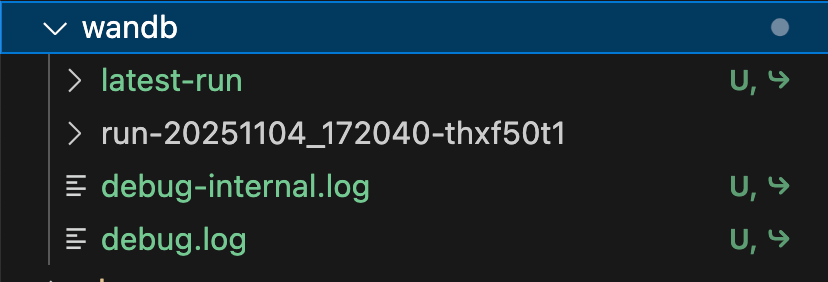
3.1 Locating Your Log Files
wandb log files refer to the folders that wandb automatically creates in the training directory (default is the wandb directory) during experiment tracking, as shown below:
3.2 Method 1: Command Line Conversion
The conversion command is:
swanlab convert -t wandb-local --wb-dir [WANDB_LOG_DIR] --wb-run-dir [WANDB_RUN_DIR]Supported parameters are as follows:
-t: Conversion type. Options: wandb, tensorboard, mlflow, wandb-local.-p: SwanLab project name.-w: SwanLab workspace name.--mode: (str) Selection mode. Default is "online". Options:["online", "local", "offline", "disabled"]-l: logdir path.--wb-dir: The wandb log directory to be converted. Default:./wandb.--wb-run-dir: The specific wandb run's directory name. If this parameter is omitted, all runs within the wb-dir will be uploaded.--wb-runid: When used with--resume, serves as the SwanLab Run ID for resuming.--resume: Resume mode; must be used together with--wb-runid.
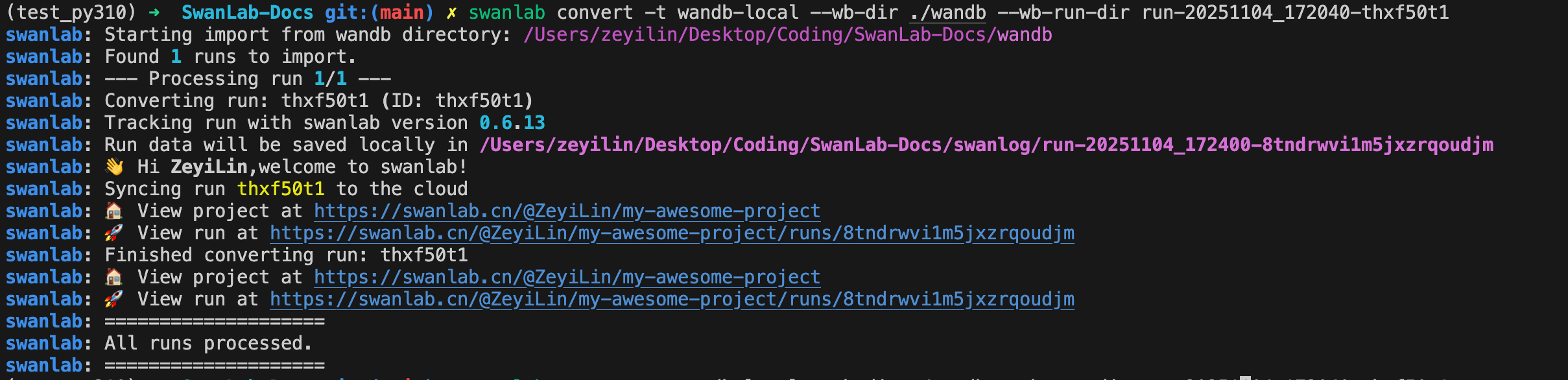
Example:
3.3 Method 2: Code Conversion
from swanlab.converter import WandbLocalConverter

wb_converter = WandbLocalConverter()
# wandb_run_dir is optional
wb_converter.run(root_wandb_dir="WANDB_DIR", wandb_run_dir="WANDB_RUN_DIR")
Parameters supported by WandbLocalConverter:
project: SwanLab project name.workspace: SwanLab workspace name.mode: (str) Logging mode. Default is "online". Options:["online", "local", "offline", "disabled"]log_dir: Path where SwanLab log files are stored (thelogdirparameter is deprecated; uselog_dirinstead).tags: (list) List of experiment tags.resume: (bool) Resume mode, default is False. Must be used withwb_run_idinrun().root_wandb_dir: Path to the wandb log directory. Default:./wandb(can be overridden inrun()).wandb_run_dir: The specific wandb run directory name (can be overridden inrun()).
Parameters supported by WandbLocalConverter.run:
root_wandb_dir: The path to the wandb log file directory.wandb_run_dir: The wandb run directory name.wb_run_id: When used withresume=True, serves as the SwanLab Run ID for resuming.