

Deploying with Kubernetes  APP v3.5.0
If you need to migrate from the Docker version to the Kubernetes version, please refer to this document. The SwanLab Python SDK version supported by the Kubernetes version is >= 0.7.6
If you want to use Kubernetes for self-hosted deployment of SwanLab, please follow the installation process below.

Resources and Concepts:
- SwanHubX/charts - Self-Hosted Service Releases: SwanLab's Kubernetes Helm Chart repository
swanlab-self-hosted: The default RELEASE name for the SwanLab self-hosted service deployed in the cluster<your_namespace>: The namespace for the SwanLab self-hosted service deployed in the cluster, please replace with the actual namespace used for deployment
🧱 Prerequisites
To deploy the self-hosted version of SwanLab using Kubernetes, please ensure your Kubernetes and related infrastructure meet the following requirements:
| Software/Infrastructure | Version/Configuration Requirement | Necessity Explanation |
|---|---|---|
| kubernetes | v1.24 and above | Official testing and validation cover v1.24+ versions. To ensure API compatibility and system stability, it is not recommended to deploy in clusters with versions lower than this. |
| helm | version>=3.9 | SwanLab Chart packages require features from Helm v3.9 or newer, and are not compatible with earlier versions or Helm v2 (Tiller mode). |
| RBAC Permissions | Namespace Admin | The deploying account needs to have write permissions within the namespace for the SwanLab self-hosted service. Core resources include: Deployment, StatefulSet, Service, PVC, Secret, ConfigMap, etc. |
| Network Access (Egress) | *.swanlab.cn | Cluster nodes need to have the ability to access the public internet (or have a configured NAT gateway). A public egress bandwidth of ≥ 100Mbps is recommended 1. repo.swanlab.cn: Used to pull application images. 2. api.swanlab.cn: Used for online License activation and validation. |
| Object Storage | AWS S3 protocol compatible | Media resources and other files reported by SwanLab are stored in object storage by default. To save storage costs, external object storage integration is recommended, ensuring S3 API compatibility |
🧾 Resource Inventory
Application Service Images
⚠️ Note: The
values.yamlimage tags are set to empty strings by default, which automatically syncs the latest version number from the template as the image tag. Generally, no modification is needed. Special hotfix patch version images require manual tag filling.
| Component | Image Address | values.yaml Config Path | Description |
|---|---|---|---|
| swanlab-server | repo.swanlab.cn/self-hosted/swanlab-server:<APP_VERSION> | service.server.image | Backend core service |
| swanlab-auth | repo.swanlab.cn/self-hosted/swanlab-auth:<APP_VERSION> | service.auth.image | Authentication and authorization service |
| swanlab-house | repo.swanlab.cn/self-hosted/swanlab-house:<APP_VERSION> | service.house.image | Backend experiment metrics OLAP service |
| swanlab-cloud | repo.swanlab.cn/self-hosted/swanlab-cloud:<APP_VERSION> | service.cloud.image | Frontend experiment chart rendering component |
| swanlab-next | repo.swanlab.cn/self-hosted/swanlab-next:<APP_VERSION> | service.next.image | Frontend UI |
Infrastructure Images
⚠️Note: When a storage component chooses to customize base service resources, the corresponding images below can be ignored (using self-built external services).
WARNING
- Due to the varying permission models of different Kubernetes clusters, the SwanLab K8s version does not use Operator-based deployment yet, and the base database services are deployed as single instances
- To integrate self-built or cloud provider high-availability databases, please refer to Custom Value Configuration
- Before integrating an external database, it is recommended to test the RTT between the cluster and the database instance by referring to the FAQ
| Component | Image Address | values.yaml Config Path | Description |
|---|---|---|---|
| Traefik | repo.swanlab.cn/public/traefik:3.6 | gateway.image | Reverse proxy / gateway entry |
| Identify | repo.swanlab.cn/public/swanlab-helper/identify:v1.2 | gateway.identifyImage | Gateway authentication auxiliary image |
| Busybox | repo.swanlab.cn/public/busybox:1.37.0 | helper.image | Deployment auxiliary init container |
| Vector | repo.swanlab.cn/public/vector:0.51.1-debian | vector.image | Metrics aggregation & forwarding |
| PostgreSQL | repo.swanlab.cn/self-hosted/postgres:16.1 | dependencies.postgres.image | PostgreSQL relational database (users, projects, experiment metadata) |
| Redis | repo.swanlab.cn/self-hosted/redis-stack:7.4.0-v8 | dependencies.redis.image | Cache and session storage |
| ClickHouse | repo.swanlab.cn/self-hosted/clickhouse-server:24.3 | dependencies.clickhouse.image | Experiment metrics and logs column database |
| MinIO | repo.swanlab.cn/self-hosted/minio/minio:RELEASE.2025-09-07T16-13-09Z | dependencies.s3.image | S3 compatible object storage (experiment media resources and exported log files) |
| MinIO MC | repo.swanlab.cn/self-hosted/minio/mc:RELEASE.2025-08-13T08-35-41Z | dependencies.s3.mcImage | MinIO client tool (bucket initialization, etc.) |
🪜 Installation Guide
INFO
This guide uses the [External S3 Object Storage Integration] + [Cluster Databases via PVC-mounted Cloud Disks] deployment approach.
1. Create Secret
It is recommended to use an existing online object storage service (must be compatible with AWS S3 protocol). Please ensure you have created AK/SK with write permissions, refer to the following yaml:
swanlab-self-hosted-secret.yaml Template
apiVersion: v1
kind: Secret
metadata:
  name: swanlab-self-hosted-secret-s3
  namespace: <your_namespace> # Please replace with the actual namespace
type: Opaque
stringData:
  accessKey: xxxx
secretKey: xxxx# Create secret in the cluster
kubectl apply -f swanlab-self-hosted-secret.yaml
# View secret
kubectl get secret swanlab-self-hosted-secret-s3 -n <your_namespace>2. Create PVC
The SwanLab self-hosted service mainly depends on the following base service storage resources:
| Base Resource | PVC Name | Recommended Storage Size |
|---|---|---|
| Redis | swanlab-redis-pvc | ≥ 50G |
| PostgreSQL | swanlab-postgres-pvc | ≥ 100G |
| ClickHouse | swanlab-clickhouse-pvc | ≥ 1000G |
| Vector | data-swanlab-self-hosted-vector-0 / data-swanlab-self-hosted-vector-1 | Each replica ≥ 60G, two independent storage volumes |
| 「Optional」MinIO | swanlab-minio-pvc | ≥ 1000G, online object storage is preferred |
WARNING
storageClassNameshould be based on the cloud disk type mounted in your cluster (e.g., Tencent Cloud's default cloud diskcbs), requiring support for dynamic expansion and snapshot policies- Vector is deployed as a
StatefulSet, PVC names are not modifiable by default - It is recommended to ensure that PVCs related to
vector/postgres/redis/clickhouseare all in Bound status before proceeding with subsequent installation steps (if the disk binding policy of thestorageClassiswaitForFirstConsumer, there is no need to wait forBound)
swanlab-self-hosted-pvc.yaml Template
# ----------------------------
# PersistentVolumeClaim for Redis
# ----------------------------
apiVersion: v1
kind: PersistentVolumeClaim
metadata:
  name: swanlab-redis-pvc
  namespace: <your_namespace> # Replace with actual namespace
spec:
  accessModes:
    - ReadWriteOnce
  resources:
    requests:
      storage: 50Gi
  storageClassName: "" # Replace with the actual storageClass in your cluster
  volumeMode: Filesystem
---
# ----------------------------
# PersistentVolumeClaim for PostgreSQL
# ----------------------------
apiVersion: v1
kind: PersistentVolumeClaim
metadata:
  name: swanlab-postgres-pvc
  namespace: <your_namespace> # Replace with actual namespace
spec:
  accessModes:
    - ReadWriteOnce
  resources:
    requests:
      storage: 100Gi
  storageClassName: "" # Replace with the actual storageClass in your cluster
  volumeMode: Filesystem
---
# ----------------------------
# PersistentVolumeClaim for ClickHouse
# ----------------------------
apiVersion: v1
kind: PersistentVolumeClaim
metadata:
  name: swanlab-clickhouse-pvc
  namespace: <your_namespace> # Replace with actual namespace
spec:
  accessModes:
    - ReadWriteOnce
  resources:
    requests:
      storage: 1000Gi
  storageClassName: "" # Replace with the actual storageClass in your cluster
  volumeMode: Filesystem
---
# ----------------------------
# PersistentVolumeClaim for Vector-0
# ----------------------------
apiVersion: v1
kind: PersistentVolumeClaim
metadata:
  name: data-swanlab-self-hosted-vector-0
  namespace: <your_namespace> # Replace with actual namespace
spec:
  accessModes:
    - ReadWriteOnce
  resources:
    requests:
      storage: 60Gi
  storageClassName: "" # Replace with the actual storageClass in your cluster
  volumeMode: Filesystem
---
# ----------------------------
# PersistentVolumeClaim for Vector-1
# ----------------------------
apiVersion: v1
kind: PersistentVolumeClaim
metadata:
  name: data-swanlab-self-hosted-vector-1
  namespace: <your_namespace> # Replace with actual namespace
spec:
  accessModes:
    - ReadWriteOnce
  resources:
    requests:
      storage: 60Gi
  storageClassName: "" # Replace with the actual storageClass in your cluster
volumeMode: Filesystem# Create PVC
kubectl apply -f swanlab-self-hosted-pvc.yaml
# Verify PVC status
kubectl get pvc -n <your_namespace>3. Fill in Values
For the complete values.yaml configuration options, please refer to the Custom Value Configuration documentation.
You can view the original value template used by swanlab-self-hosted at values.yaml template, or view it with the following command:
helm show values swanlab/self-hostedWe strongly recommend saving the values.yaml used for deployment to ensure smooth upgrades later. Below are the related values.yaml modification instructions:
3.1 PVC Binding
The existingClaim of each component under the dependencies field must match the PVC names created in Step 2:
| Component | values.yaml Path | Corresponding PVC Name |
|---|---|---|
| PostgreSQL | dependencies.postgres.persistence.existingClaim | swanlab-postgres-pvc |
| Redis | dependencies.redis.persistence.existingClaim | swanlab-redis-pvc |
| ClickHouse | dependencies.clickhouse.persistence.existingClaim | swanlab-clickhouse-pvc |
Modification example:
dependencies PVC Modification Example
dependencies:
  postgres: # PostgreSQL database configuration
    fullnameOverride: ""

    image: # Image configuration
      # Full image repository path (e.g., ghcr.io/cloudnative-pg/postgresql)
      repository: repo.swanlab.cn/self-hosted/postgres
      # Image tag/version. SwanLab recommends 16.x and above
      tag: "16.1"
      # Kubernetes image pull policy (Always, IfNotPresent, Never)
      pullPolicy: "IfNotPresent"

    username: ""
    password: ""

    persistence: # Persistent storage configuration
      # Kubernetes StorageClass for dynamic provisioning
      storageClass: "disk-cloud-auto"
      # Database storage volume size
      storageSize: "10Gi"

      # Use an existing PVC (leave empty to auto-create a new PVC)
      existingClaim: "swanlab-postgres-pvc" # ⚠️: Usually only this name needs to be modified to match the created postgres PVC name

    customLabels: {}
    customAnnotations: {}
    customPodLabels: {}
    customPodAnnotations: {}
    customTolerations: []
    customNodeSelector: {}
resources: {}dependencies:
redis: # Redis configuration
fullnameOverride: ""
image: # Image configuration
# Full image repository path (e.g., redis/redis-stack)
repository: repo.swanlab.cn/self-hosted/redis-stack
# Image tag/version
tag: "7.4.0-v8"
# Kubernetes image pull policy (Always, IfNotPresent, Never)
pullPolicy: "IfNotPresent"
persistence: # Persistent storage configuration
storageClass: "disk-cloud-auto"
storageSize: "10Gi"
# Use an existing PVC (leave empty to auto-create a new PVC)
existingClaim: "swanlab-redis-pvc" # ⚠️: Usually only this name needs to be modified to match the created redis PVC name
customLabels: {}
customAnnotations: {}
customPodLabels: {}
customPodAnnotations: {}
customTolerations: []
customNodeSelector: {}
resources: {}dependencies:
clickhouse: # ClickHouse configuration
fullnameOverride: ""
image: # Image configuration
# Full image repository path (e.g., clickhouse/clickhouse-server)
repository: repo.swanlab.cn/self-hosted/clickhouse-server
# Image tag/version
tag: "24.3"
pullPolicy: "IfNotPresent"
# Authentication credentials
# Leave empty if using existingSecret
username: ""
password: ""
persistence: # Persistent storage configuration
storageClass: "disk-cloud-auto"
storageSize: "20Gi"
# Use an existing PVC (leave empty to auto-create a new PVC)
existingClaim: "swanlab-clickhouse-pvc" # ⚠️: Usually only this name needs to be modified to match the created clickhouse PVC name
customLabels: {}
customAnnotations: {}
customPodLabels: {}
customPodAnnotations: {}
customTolerations: []
customNodeSelector: {}
resources: {}3.2 Application Image Tags
The tag of the five application images under service (server / auth / house / cloud / next) should be set to empty strings, and the Chart will automatically inject the correct version number during rendering.
3.3 Vector Storage
vector.persistence.storageClass and vector.persistence.storageSize should be consistent with the size when creating the vector PVC. The default size needs to be changed to 60Gi.
vector:
  persistence:
    storageClass: "" # Replace with the actual storageClass in your cluster
    storageSize: "60Gi"
3.4 External S3 Integration Configuration
The integrations.s3 field needs to be manually filled based on the object storage service you use. It is recommended to separate public and private buckets. If your cloud provider distinguishes S3 protocol endpoint access, please pay special attention to filling in the S3 endpoint. For detailed field descriptions and configuration examples, please refer to the External S3 Integration section. The following uses Alibaba Cloud OSS buckets as a configuration example:
integrations:
  s3:
    enabled: true
    existingSecret: "swanlab-self-hosted-secret-s3"
    public:
      ssl: true
      endpoint: "oss-cn-beijing.aliyuncs.com" # Replace with the actual S3 endpoint (without bucket prefix)
      region: "cn-beijing"
      pathStyle: false
      port: 443
      domain: "https://<public_bucket>.oss-cn-beijing.aliyuncs.com" # Must include the https:// prefix
      bucket: "swanlab-public-bucket"
    private:
      ssl: true
      endpoint: "oss-cn-beijing.aliyuncs.com"
      region: "cn-beijing"
      pathStyle: false
      port: 443
      bucket: "swanlab-private-bucket"
CORS Configuration Notice
⚠️ Note: Be sure to configure the bucket CORS rules (allowing GET/POST/PUT/HEAD) in the object storage console and enable public read access for the Public bucket, otherwise experiment image uploads may fail or avatars may not display properly. See FAQ: Object Storage Configuration Troubleshooting
4. Add Helm Repository
You can install the SwanLab self-hosted K8S service via helm.
First, set up local repository mapping:
helm repo add swanlab https://helm.swanlab.cn
# Update repository
helm repo update
# List all chart versions
helm search repo swanlab/self-hosted --versions
5. Execute Installation
You can choose one of the following installation methods based on your cluster's network environment.
Option 1: Helm Repository Installation
If your cluster nodes can directly access the Helm repository (i.e., cluster nodes can directly access github.com), you can execute the installation with the following commands:
⚠️ Note: The chart packages at https://helm.swanlab.cn are indexed by version tags in GitHub Release. Please confirm network connectivity in advance!
# It is recommended to use --dry-run first to verify template compatibility
helm install swanlab-self-hosted swanlab/self-hosted \
  -f <your_own_values.yaml> \
  --namespace <your_namespace> \
--dry-run- After confirming there are no errors, remove the
--dry-runoption to execute the installation
Option 2: Local Chart Package Installation
If your cluster nodes cannot directly access the Helm repository (i.e., cluster nodes cannot directly access github.com), you can pull the chart package to local via OCI method and then execute the installation:
If you encounter a 401 authentication failure, you can clear any existing helm login state on your machine with
helm registry logout xxx.com.
# Pull chart package to local
helm pull oci://swanlab-registry.cn-hangzhou.cr.aliyuncs.com/chart/self-hosted --version <latest_chart_version>
# Extract chart package, expecting only one self-hosted/ folder
tar -zxvf self-hosted-<latest_chart_version>.tgz
Then use the local chart package to verify:
# It is recommended to use --dry-run first to verify template compatibility
helm install swanlab-self-hosted ./self-hosted/ \
  -f <your_own_values.yaml> \
  --namespace <your_namespace> \
--dry-run- After confirming there are no errors, remove the
--dry-runoption to execute the installation
By installing swanlab/self-hosted, you can install the SwanLab self-hosted application on k8s. The installation result will print similar information in the terminal:
Release "swanlab-self-hosted" has been upgraded. Happy Helming!
NAME: swanlab-self-hosted
LAST DEPLOYED: Sat Dec 13 17:52:05 2025
NAMESPACE: self-hosted
STATUS: deployed
REVISION: 6
TEST SUITE: None
NOTES:
Thank you for installing self-hosted!

Get the application URL by running these commands:

1. Access via kube-proxy:
   Run the following command to forward your local port 8080 to the service:
     kubectl port-forward --namespace self-hosted svc/swanlab-self-hosted 8080:80

   Then, you can access the service via:
     http://127.0.0.1:8080

2. Expose Service Externally:
   SwanLab self-hosted is not exposed to the public internet.
   If you wish to expose this service, you need to configure a LoadBalancer manually or use an Ingress Controller.

   Please refer to the official documentation for configuration details:
   https://docs.swanlab.cn/en/self_host/kubernetes/deploy.html
As shown above, the swanlab-self-hosted self-hosted service cannot be directly accessed via external network by default. You can access this service locally using the port-forward functionality. If you wish to enable external access (via IP or domain name), please refer to Configuring Application Access Entrypoint.
Here is an example of accessing it locally; open a terminal and execute:
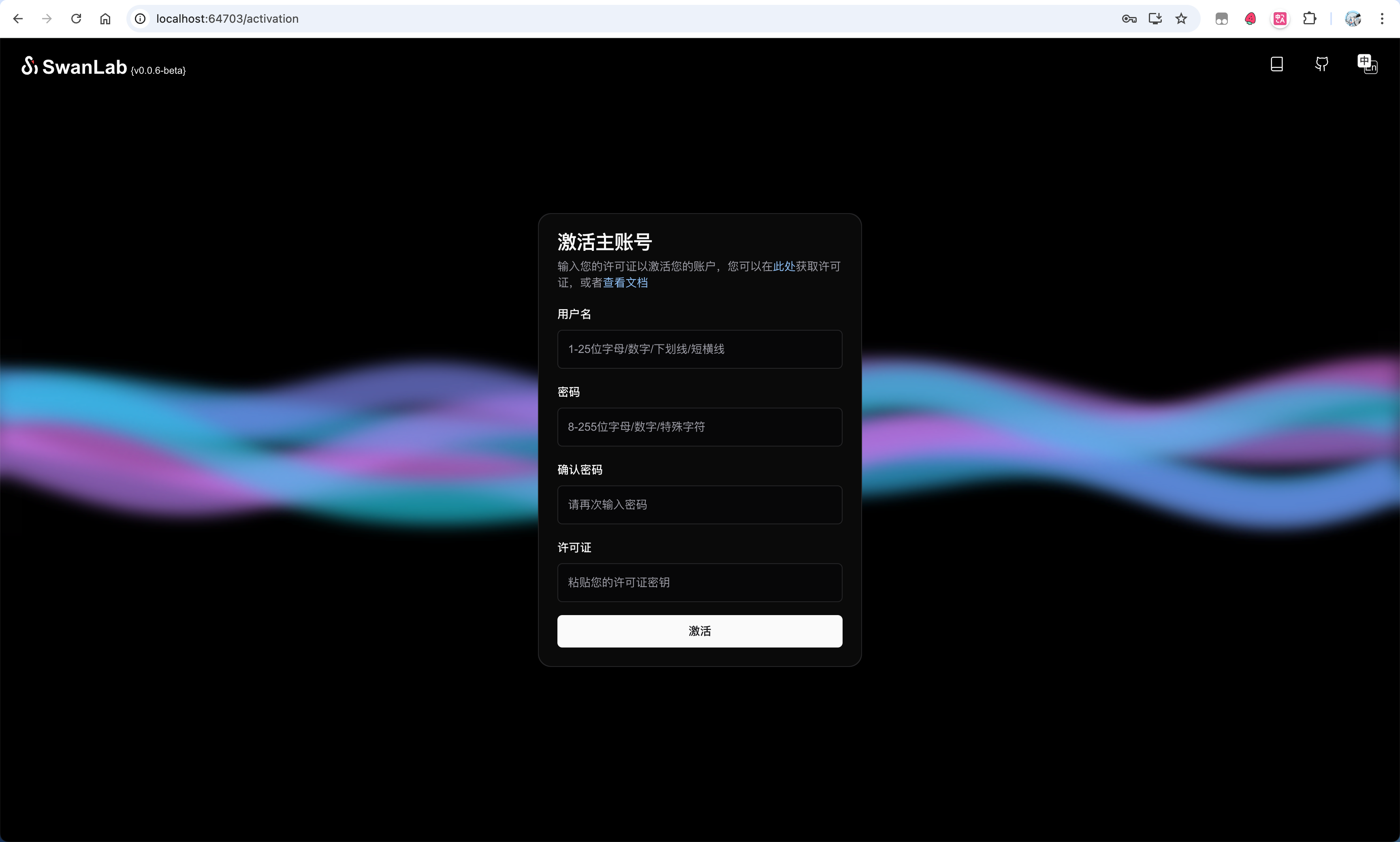
kubectl port-forward --namespace self-hosted svc/swanlab-self-hosted 8080:80Then you can access it in your browser at: http://127.0.0.1:8080 to see the SwanLab page:
📖 License Activation
Personal Edition Activation
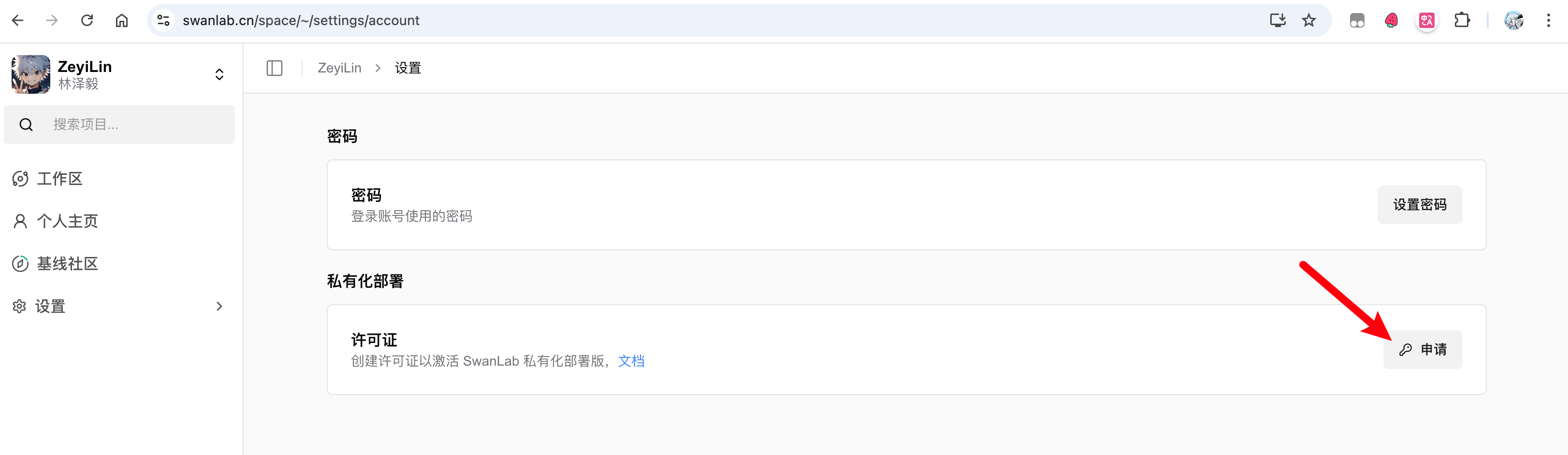
Now, you need to activate your main account. Activation requires 1 License. For personal use, you can apply for a free one on the SwanLab official website under "Settings" - "Account & License".
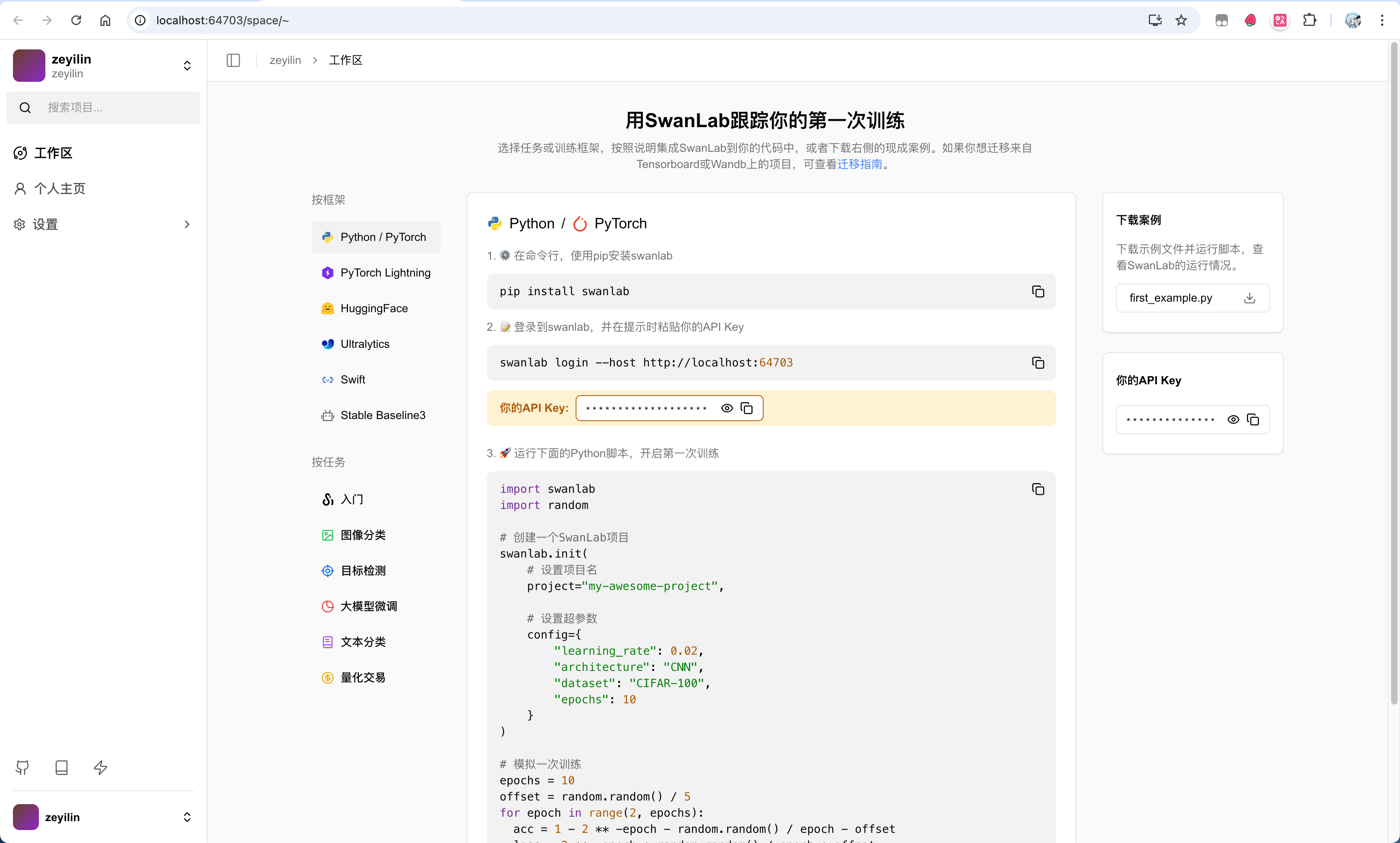
After obtaining the License, return to the activation page, fill in the username, password, confirm password, and License, then click activate to complete the creation.
Enterprise Edition Activation
If you need to test enterprise edition capabilities, please contact contact@swanlab.cn, and we will send a test License to that email.
⚙️ Verification Testing
After deployment is complete, you can use the following Python code to verify scalar and media metrics reporting
Metrics Reporting Test
import swanlab
import random
import numpy as np  # Add NumPy import

swanlab.login(
    api_key="xxxxx",
    host="https://xxxxx"
)

# Create a SwanLab project
swanlab.init(
    # Set project name
    project="my-first-project",
    experiment_name="my-first-experiment",
    # Set hyperparameters
    config={
        "learning_rate": 0.02,
        "architecture": "CNN",
        "dataset": "CIFAR-100",
        "epochs": 10
    }
)

# Simulate a training session
epochs = 10
offset = random.random() / 5
for epoch in range(2, epochs):
    acc = 1 - 2 ** -epoch - random.random() / epoch - offset
    loss = 2 ** -epoch + random.random() / epoch + offset
    swanlab.log({
        "step_time": acc,
        "speed": loss
    })

# Generate random noise image (64x64 RGB, random pixel values)
random_noise = np.random.randint(0, 255, (64, 64, 3), dtype=np.uint8)
img = swanlab.Image(random_noise, caption="Random Noise")
swanlab.log({
    "image": img
})

# [Optional] Finish training, this is necessary in notebook environments
swanlab.finish()
Expected result is shown below⬇️:
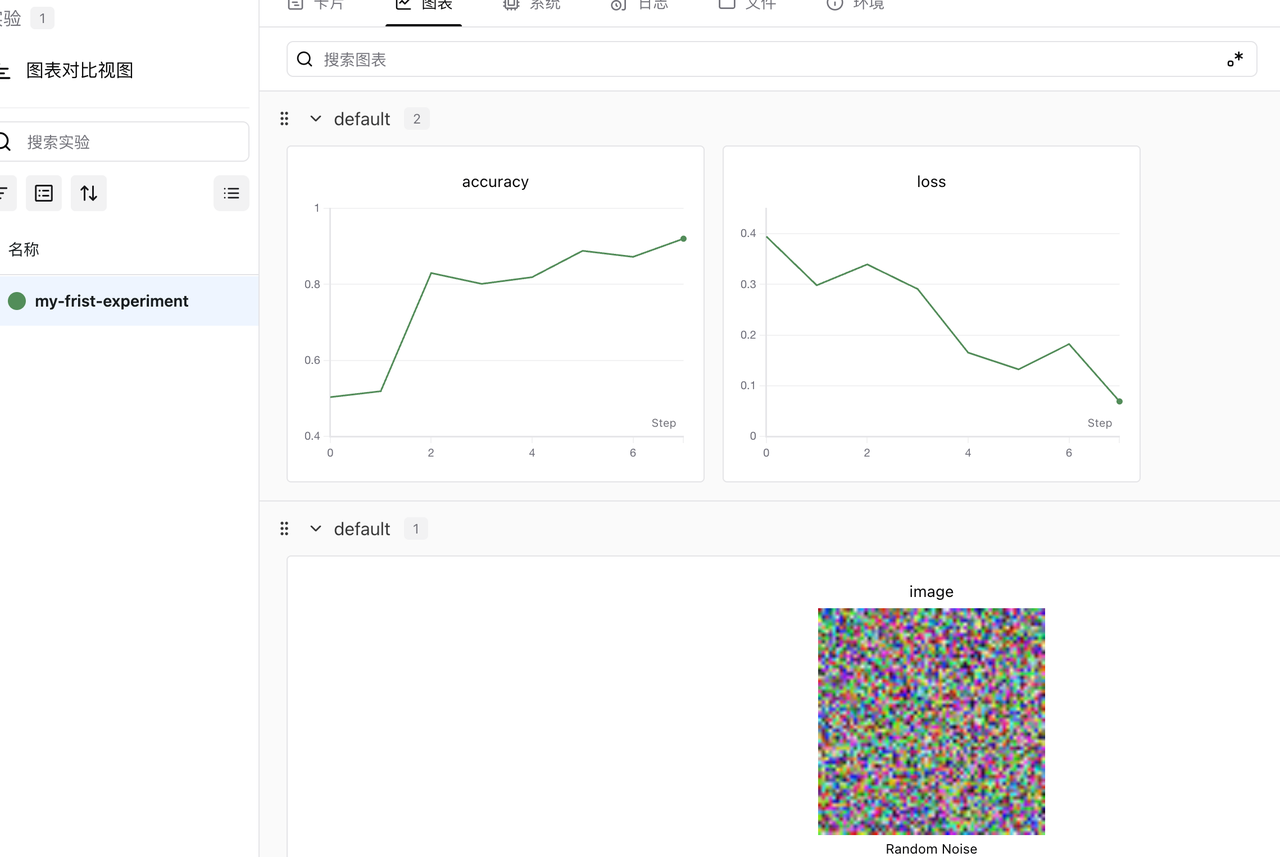
You can verify the following features:
- ⬜ Check if metrics can be reported normally
- ⬜ Check if images can be uploaded and displayed normally
- ⬜ Check if metric CSV downloads work smoothly
- ⬜ Check if user avatars can be displayed normally
❓ FAQ
Value Configuration
You can view all configurable options for swanlab-self-hosted here.
For detailed field descriptions and configuration practices, please refer to the Custom Value Configuration documentation, which covers:
- Global Configuration: Pod anti-affinity, login domain, etc.
- Application Services: Replica count, resource limits, labels and annotations, etc.
- Gateway Configuration: Application access entrypoint, ports, etc.
- Built-in Base Services: PostgreSQL / Redis / ClickHouse / MinIO storage resource configuration
- External Service Integration: Connecting external PostgreSQL, Redis, ClickHouse, S3 object storage
[Replica Count] How should the recommended service replica count be configured?
The following are recommended replica configuration best practices based on online operational experience. You can adjust them by modifying the replicas field of the corresponding service in values.yaml:
| Service Name | Replica Count | Description |
|---|---|---|
| clickhouse | 1 | [Not modifiable] Column database, responsible for experiment metrics storage |
| postgres | 1 | [Not modifiable] Relational database, responsible for metadata and relational records |
| redis | 1 | [Not modifiable] In-memory database, caching session data |
| vector | 2 | [Not modifiable] Metrics aggregation & forwarding |
| traefik | 2 | [Adjustable] Main gateway, distributes service traffic |
| swanlab-server | ≥ 3 | [Adjustable] SwanLab core service, dynamically adjust based on service load |
| swanlab-auth | 2 | [Adjustable] SwanLab authentication and authorization service, adjust based on service load |
| swanlab-house | ≥ 3 | [Adjustable] SwanLab metrics analysis service, dynamically adjust based on service load |
| swanlab-next | 2 | [Adjustable] SwanLab frontend framework |
| swanlab-cloud | 1 | [Adjustable] SwanLab frontend chart page |
[Resource Limits] How to limit the recommended CPU/memory resource limits for each service?
To be added
Updates and Rollback
To update the SwanLab version or rollback after a failed update, please refer to the Update & Rollback documentation.
Prometheus Observability Integration Guide
Please refer to the Observability Configuration documentation.