FAQ
This document records frequently asked questions during the deployment of SwanLab K8s self-hosted version.
[Permissions] Does deploying the service require elevated permissions (such as deploying CRDs or Controllers)?
- No.
[Data Migration] Can the original service remain online during data migration?
- ❌ No
The original service must be stopped during migration. If the original service is not stopped, data gaps will occur. In such cases, you may consider using swanlab sync to upload data to the new service.
[Node Assignment] How to schedule SwanLab self-hosted service Pods to specific nodes?
In values.yaml, all services support specifying a node selector through the customNodeSelector field. Kubernetes will only schedule Pods to nodes with the corresponding labels.
Label a node:
kubectl label nodes <node-name> swanlab=trueExample: Schedule SwanLab Server to nodes with the swanlab=true label:
service:
  server:
    customNodeSelector: { "swanlab": "true" }
The gateway also supports this:
gateway:
  customNodeSelector: { "swanlab": "true" }
If you need to run on nodes with Taints, you can use it together with customTolerations:
service:
  server:
    customNodeSelector: { "swanlab": "true" }
    customTolerations:
      - key: "dedicated"
        operator: "Equal"
        value: "swanlab"
        effect: "NoSchedule"
TIP
customNodeSelector and customTolerations are common fields for all services, including application services (gateway, vector, service.server, service.auth, service.house, service.cloud, service.next) and base services (dependencies.postgres, dependencies.redis, dependencies.clickhouse, dependencies.s3). Configure them individually for each service as needed.
[Slow Response] How to test the RTT between the cluster and external databases?
When integrating external PostgreSQL, Redis, or ClickHouse, you can create temporary test Pods in the cluster to measure the RTT (Round-Trip Time) between cluster nodes and the database instance.
PostgreSQL:
# Replace with your actual PostgreSQL connection string
kubectl run pg-client --rm -i --tty=false \
  --image=repo.swanlab.cn/public/postgres:16.1 \
  --restart=Never \
  -n <your_namespace> \
  -- sh -c '
export DATABASE_URL="postgres://xxxx:xx@<url>:<port_number>/app"
psql "$DATABASE_URL" -X -qAt <<'"'"'SQL'"'"'
\timing on
select 1;
select 1;
select 1;
select 1;
select 1;
select 1;
select 1;
select 1;
SQL
'Redis:
# Replace with your actual Redis connection string
kubectl run redis-rtt --rm -i \
  --image=repo.swanlab.cn/self-hosted/redis-stack:7.4.0-v8 \
  --image-pull-policy=IfNotPresent \
  --restart=Never -n <your_namespace> -- \
sh -c 'redis-cli -u "redis://<user>:<password>@<redis_host>:6379/0" --latency | awk "{printf \"min: %s ms | max: %s ms | avg: %s ms | samples: %s\n\", \$1, \$2, \$3, \$4}"'ClickHouse:
# Replace with your actual ClickHouse username and password
kubectl run ch-rtt --rm -i \
  --image=repo.swanlab.cn/self-hosted/clickhouse-server:24.3 \
  --image-pull-policy=IfNotPresent \
  --restart=Never -n <your_namespace> -- sh -c '
clickhouse-benchmark --concurrency 1 --iterations 1000 \
  --host <clickhouse_host> --port 9000 \
  --user <your_username> --password <your_passwd> \
  --query "SELECT 1" 2>&1 \
| awk "
/QPS:/ { split(\$0, x, \"QPS: \"); split(x[2], y, \",\"); qps=y[1]+0; avg=1000/qps }
/^99\\.000%/ { split(\$0, t, \" \"); p99=t[2]*1000 }
END { printf \"clickhouse RTT: avg=%.3f ms  p99=%.3f ms  (QPS %.2f)\n\", avg, p99, qps }
"
'
TIP
It is recommended that the RTT between cluster nodes and the database instance be within 0.3ms, and that the nodes running SwanLab services and the database be in the same availability zone whenever possible. See Custom Value Configuration for details.
[Resource Limits] How to limit the CPU and memory usage of SwanLab services?
In values.yaml, all application services support setting CPU and memory Requests / Limits through the resources field, with the format consistent with Kubernetes native resources.
Example: Limit resource usage for SwanLab Server:
service:
  server:
    resources:
      requests:
        cpu: "2"
        memory: "2Gi"
      limits:
        cpu: "4"
        memory: "4Gi"
All services can be configured as needed. When not set, there are no limits by default. Base services (dependencies.postgres, dependencies.redis, dependencies.clickhouse, dependencies.s3) also support the resources field.
[Images] The cluster cannot access the public internet, how to download and update images?
- You can pre-download in a public network environment by manually pulling all required images from the SwanLab public image repository (
repo.swanlab.cn) usingdocker pull, and then uploading them to your internal private image repository (docker push).
[High Availability] How to ensure service high availability and data security?
Based on database configuration, there are two main scenarios:
For local database usage:
- During deployment, each PVC request corresponds to an independent cloud SSD disk, supporting seamless expansion.
- The cloud disk itself handles persistent storage. Configure a snapshot policy on a daily basis, with a TTL expiration time recommended to be set to 2~7 days, ensuring daily data reliability.
For external cloud database usage:
- This can be ensured by the cloud provider's own database master-slave synchronization. You can contact the cloud database product technical support of each public cloud provider, or the DBA of your self-built cluster for related configuration.
[Object Storage] Experiment image upload failed / CSV and logs cannot be downloaded / Avatar display abnormal?
These issues are strongly related to S3 Object Storage configuration problems. You can locate the corresponding service error logs in the swanlab-house pod. Recommended troubleshooting order:
values.yaml Configuration Verification
- First verify whether the configuration in
integrations.s3is correct. For details, see External S3 Integration Configuration
Storage Bucket CORS Rule Configuration
- Using Alibaba Cloud OSS object storage as an example, the configuration is:
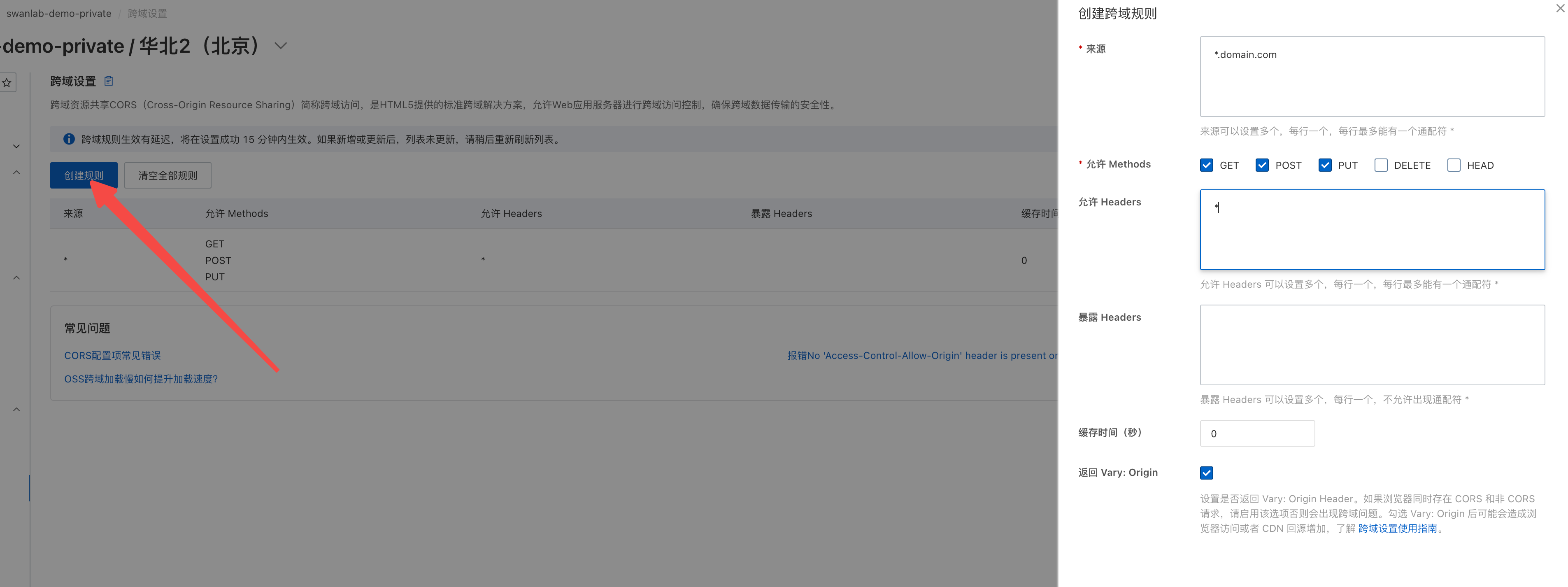
- Origin: It is recommended to open it to the top-level domain of your company's internal domain. For example, if your internal domain is
domain.com, you can set the origin to*.domain.com - Allowed Methods: GET, POST, PUT, HEAD
- Allowed Headers: Enter * wildcard
- Return Vary:Origin
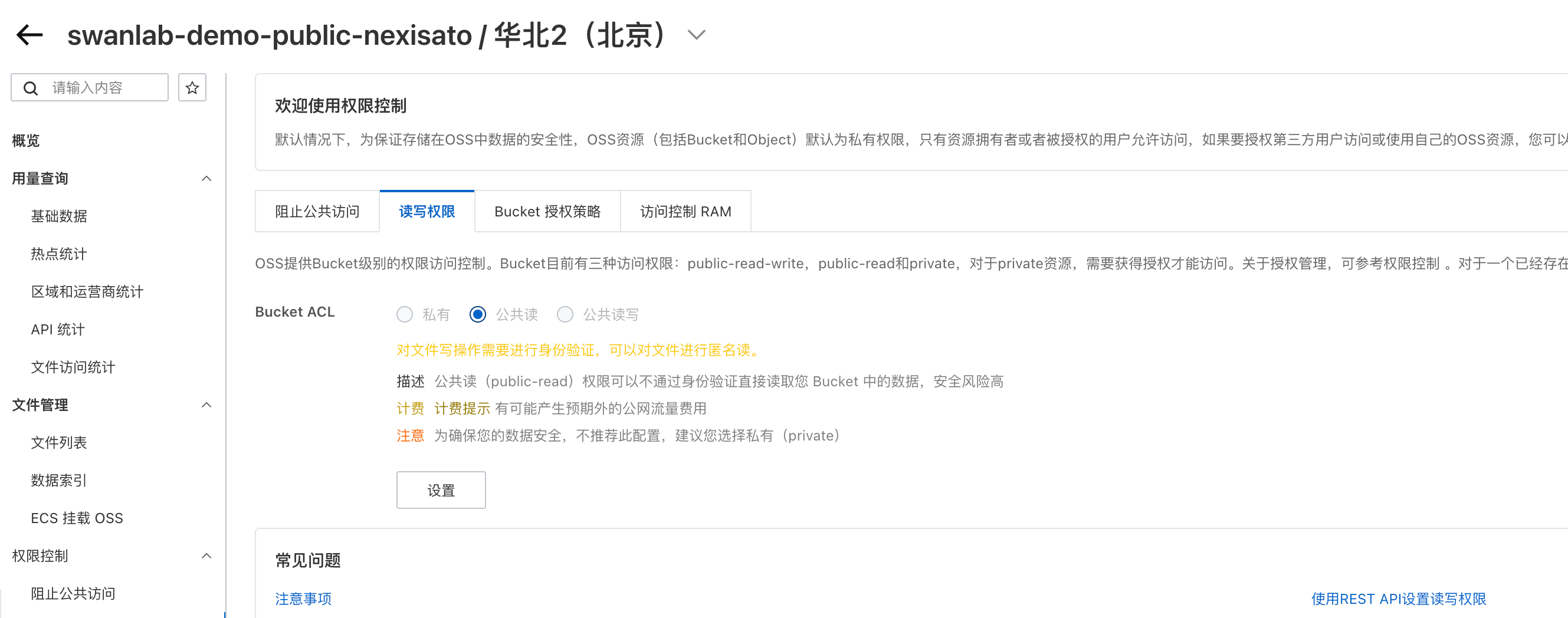
Public Bucket ACL Configuration
SwanLab's default user avatar uses colorful SVG. If it cannot be displayed correctly, it is usually because the public read permission of the public bucket has been disabled. Using Alibaba Cloud OSS as an example, you can enable it in the following settings:
"Permission Control" -> "Block Public Access", turn off the button
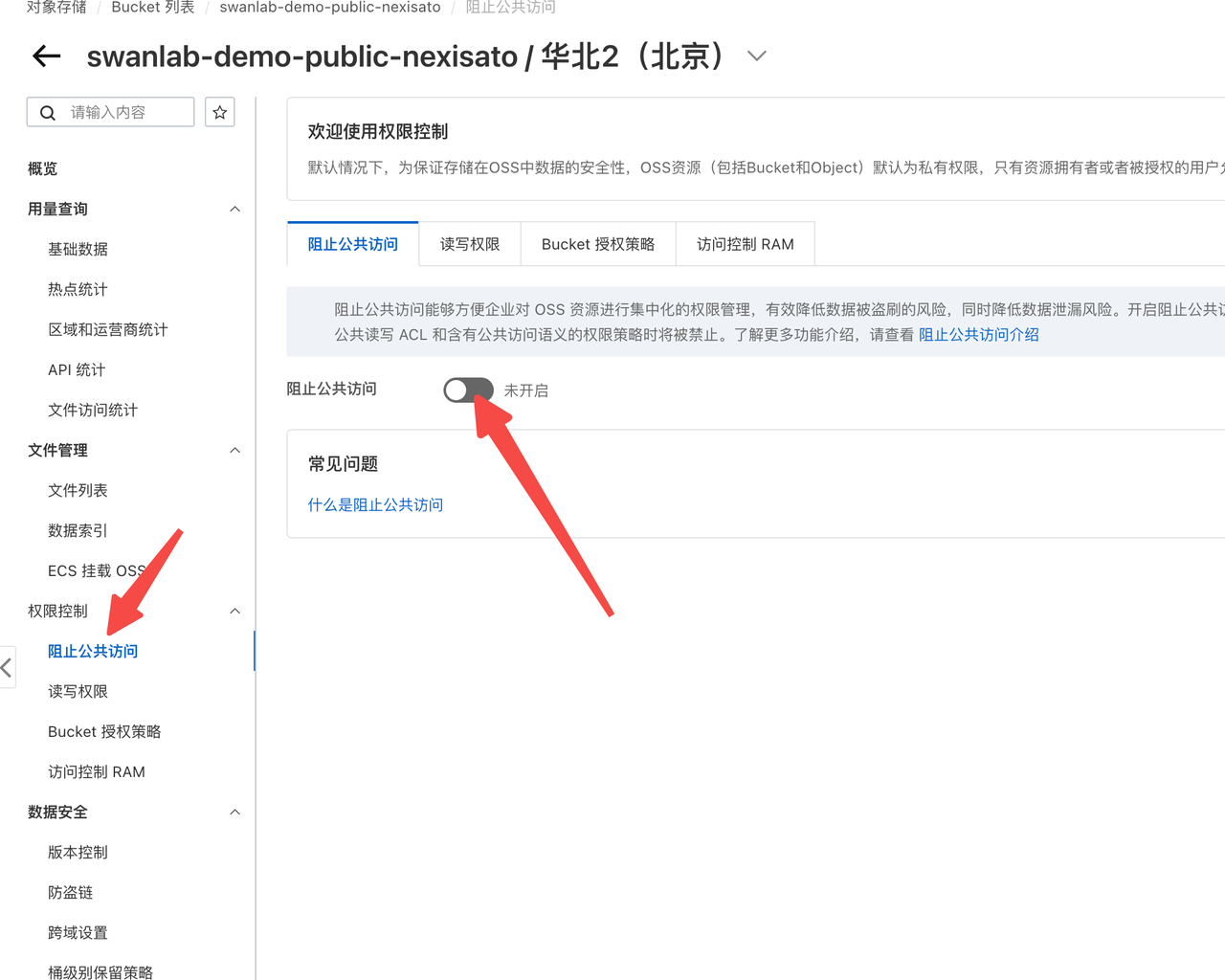
"Permission Control" -> "Read/Write Permissions", enable public read Bucket ACL