

Logging Guide
This guide describes how to view logs and integrate logging for SwanLab self-hosted services on Kubernetes.
🔍 Quick Log Viewing
For live Pods, use kubectl logs to view and export each service Pod's runtime logs:
# Follow the current Pod's logs in real time (Ctrl+C to exit)
kubectl logs -n <YOUR_NAMESPACE> -f <POD_NAME> -c <CONTAINER_NAME>

# Export the current Pod's logs to a local file
kubectl logs -n <YOUR_NAMESPACE> <POD_NAME> -c <CONTAINER_NAME> > swanlab-<CONTAINER_NAME>.log

# Export logs from the previous crashed container (only available if the container has restarted, e.g. CrashLoopBackOff)
kubectl logs -n <YOUR_NAMESPACE> <POD_NAME> -c <CONTAINER_NAME> --previous > swanlab-<CONTAINER_NAME>-previous.log

# For large log volumes, only take the last 1000 lines / last 1 hour
kubectl logs -n <YOUR_NAMESPACE> <POD_NAME> -c <CONTAINER_NAME> --tail=1000 --since=1h
☁️ Integrating Cloud Logging Services
For persistent log storage, query, and analysis, we recommend integrating a public cloud logging service (this guide uses Alibaba Cloud SLS as the example; Tencent Cloud CLS, Huawei Cloud LTS, and similar platforms can be configured in a similar way). All SwanLab services output logs to container stdout/stderr with standard Pod labels (app.kubernetes.io/service), so integrating a cloud logging service requires no changes to any SwanLab configuration.
INFO
How collection works: Alibaba Cloud's collection component LoongCollector deploys a collection Agent on every node (DaemonSet). Collection rules are declared through the CRD resource AliyunLogConfig, which selects target containers by Pod labels, and logs are automatically written to SLS-managed storage. Other cloud vendors offer similar equivalent components (Tencent Cloud LogConfig, Huawei Cloud lts-config, etc.).
1. Prerequisites
Activate SLS: Go to the SLS console and follow the prompts to activate the service on first use (pay-as-you-go billing; activation is free).
Install the collection component (LoongCollector): Go to the ACK console → Cluster list → click the target cluster → Component Management in the left sidebar → search for LoongCollector → click Install:
- For Project, choose Create a new Project, or select an existing Project
- After installation, the cluster automatically registers the
aliyunlogconfigsCRD and deploys a collection Agent on every node
TIP
LoongCollector is the upgraded successor of the original logtail component. The two supersede each other and cannot coexist in the same cluster. Check which one you have with:
# Based on the output: logtail-ds is the legacy version, loongcollector-* is the new version
kubectl -n kube-system get ds | grep -iE "loongcollector|logtail"
AliyunLogConfig is used identically under both components, matching the steps in the rest of this guide. See Logtail and LoongCollector compatibility notes
Confirm the component is ready:
kubectl -n kube-system get ds,deploy | grep -iE "loongcollector|logtail"
# The collection Agent's DaemonSet should have as many ready replicas as there are nodes, e.g.: ds/loongcollector-ds 4/4 (the DS name may vary slightly between versions)
Check RBAC permissions: AliyunLogConfig is a custom resource and is not covered by the built-in admin/edit roles. If your current user lacks permission, ask a cluster admin to create a Role in the target namespace (one-time operation):
kubectl auth can-i create aliyunlogconfigs.log.alibabacloud.com -n <YOUR_NAMESPACE>

# [Note] If this returns `no`, ask a cluster admin to run the following commands to create the log collection role permissions:
kubectl create role swanlab-logconfig-writer -n <YOUR_NAMESPACE> \
  --verb=create,get,list,watch,update,patch,delete \
  --resource=aliyunlogconfigs.log.alibabacloud.com
kubectl create rolebinding swanlab-logconfig-writer -n <YOUR_NAMESPACE> \
  --role=swanlab-logconfig-writer --user=<YOUR_USER>
2. Create Collection Configurations
All SwanLab business services write logs to container stdout/stderr with the label app.kubernetes.io/service=<service name>. Create one collection configuration per service (each service maps to its own Logstore, making it easy to set retention and query per service):
| Service | Description | Log content |
|---|---|---|
| server | Core business API service | User request handling, business logic, API error stacks |
| house | Metrics OLAP service | Experiment data writes and sync, background task execution |
| auth | Authentication service | Login authentication, token validation, permission-related requests |
The three configurations are identical except for metadata.name, logstore, configName, and the label value. Before applying, replace the placeholders in the file (all marked with comments): <YOUR_NAMESPACE> is the namespace where SwanLab runs (must match every K8sNamespaceRegex); <PROJECT_NAME> is an optional target SLS Project — if omitted, logs are written to the cluster's default project k8s-log-<cluster ID>.
Collection configuration template (swanlab-log.yaml)
# Placeholders:
#   <YOUR_NAMESPACE>: the K8s namespace where SwanLab services run; must match each K8sNamespaceRegex below
#   <PROJECT_NAME>  : optional. Target SLS Project; set this to write to a custom Project
apiVersion: log.alibabacloud.com/v1alpha1
kind: AliyunLogConfig
metadata:
  name: swanlab-server
  namespace: <YOUR_NAMESPACE>
spec:
  project: <PROJECT_NAME> # Uncomment to write logs to a custom Project
  logstore: swanlab-server # Logstore, created automatically if it does not exist
  ttl: 7 # Log retention in days; adjust as needed
  shardCount: 2
  logtailConfig:
    configName: swanlab-server # Must match metadata.name
    inputType: plugin
    inputDetail:
      plugin:
        inputs:
          - type: service_docker_stdout
            detail:
              Stdout: true
              Stderr: true
              K8sNamespaceRegex: ^<YOUR_NAMESPACE>$ # The namespace must be explicitly restricted
              IncludeK8sLabel:
                app.kubernetes.io/service: server # Select the target service by label
---
apiVersion: log.alibabacloud.com/v1alpha1
kind: AliyunLogConfig
metadata:
  name: swanlab-house
  namespace: <YOUR_NAMESPACE>
spec:
  project: <PROJECT_NAME>
  logstore: swanlab-house
  ttl: 7
  shardCount: 2
  logtailConfig:
    configName: swanlab-house
    inputType: plugin
    inputDetail:
      plugin:
        inputs:
          - type: service_docker_stdout
            detail:
              Stdout: true
              Stderr: true
              K8sNamespaceRegex: ^<YOUR_NAMESPACE>$
              IncludeK8sLabel:
                app.kubernetes.io/service: house
---
apiVersion: log.alibabacloud.com/v1alpha1
kind: AliyunLogConfig
metadata:
  name: swanlab-auth
  namespace: <YOUR_NAMESPACE>
spec:
  project: <PROJECT_NAME>
  logstore: swanlab-auth
  ttl: 7
  shardCount: 2
  logtailConfig:
    configName: swanlab-auth
    inputType: plugin
    inputDetail:
      plugin:
        inputs:
          - type: service_docker_stdout
            detail:
              Stdout: true
              Stderr: true
              K8sNamespaceRegex: ^<YOUR_NAMESPACE>$
              IncludeK8sLabel:
                app.kubernetes.io/service: auth
Apply and verify:
kubectl apply -f swanlab-log.yaml

# Check status; expected output is success
kubectl get aliyunlogconfig -n <YOUR_NAMESPACE>
Note: K8sNamespaceRegex must be explicitly set — leaving it out will mix in logs from services with the same labels in other namespaces
3. Verify
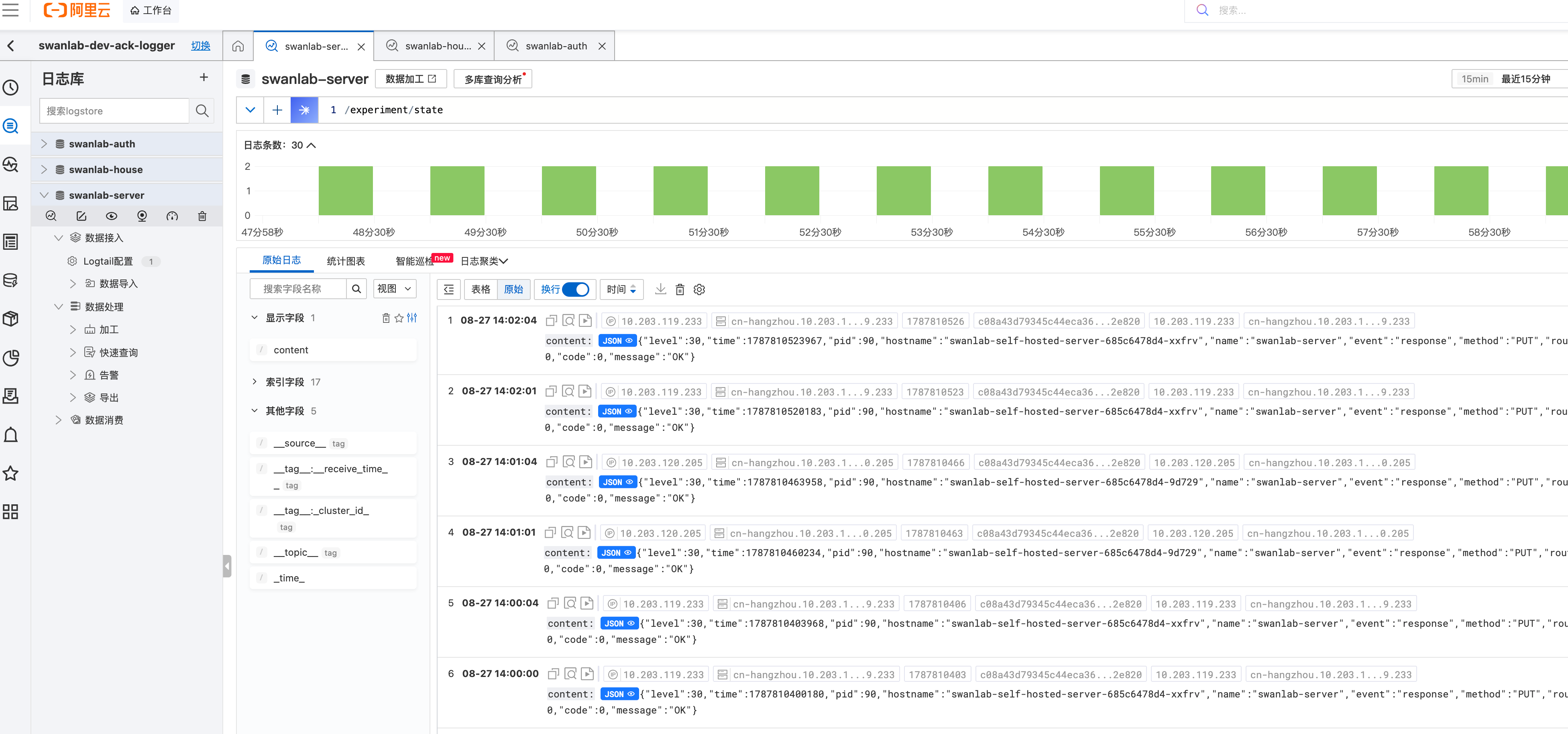
Wait about 1 minute, then open the corresponding project in the SLS console and verify that a Logstore has been created for each service.
TIP
Billing: SLS bills separately for write volume, storage, indexing, and queries; the ttl retention period is the main cost-control lever. Deleting the CR only removes the collection configuration — Logstores and historical logs must be cleaned up manually in the SLS console.
🌐 Other Platforms
The self-hosted service is not tied to any specific logging platform. It follows the standard platform-managed collection Agent + declarative label-based selection + cloud logging service query pattern:
| Platform | Collection Agent | Configuration | Log backend |
|---|---|---|---|
| Alibaba Cloud ACK | loongcollector (formerly logtail; mutually exclusive, pick one) | AliyunLogConfig CRD | SLS logging service |
| Tencent Cloud TKE | cls-agent | LogConfig CRD | CLS logging service |
| Huawei Cloud CCE | ICAgent | CCE console / LTS-side configuration | LTS logging service |
| Self-built cluster | Fluent Bit, Grafana Alloy, Vector | DaemonSet + ConfigMap (no CRD) | Loki, OpenSearch, ELK, etc. |
The integration steps are the same on every platform: install the collection Agent → declare collection rules (CRD or config file) → select target containers by label → logs are written to the backend service. Taking Tencent Cloud TKE as an example: after installing the cls-agent component, create a LogConfig CR that selects SwanLab services by the app.kubernetes.io/service label, and you can query logs in the CLS console — the workflow is exactly analogous to the Alibaba Cloud section above.
🛠️ Self-hosted Logging
For environments where cloud logging services are not available (e.g., offline data centers or data compliance requirements), you can integrate a self-hosted logging platform. Regardless of the log engine you choose, the log flow in K8s is the same:
How the flow works:
- Generation: SwanLab services write logs to container stdout/stderr, and the container runtime persists them as
/var/log/pods/<YOUR_NAMESPACE>_<pod>_<uid>/<container>/*.logfiles on the node - Collection: A collection Agent (Alloy / Fluent Bit / Vector, etc.) runs as a DaemonSet on each node, reads incremental content from the log files, and parses metadata such as namespace, pod, and container into log labels
- Writing: The Agent pushes logs to the log engine (Loki, OpenSearch, Elasticsearch, VictoriaLogs, etc.), which handles storage, indexing, and retention policies (TTL)
- Querying: Use the log engine's visualization UI (Grafana, Kibana, or the engine's built-in WebUI) to search by labels (namespace / pod / level) and keywords
WARNING
A self-hosted solution requires you to prepare the following components. We recommend aligning their selection and deployment with public cloud logging services as much as possible:
- Log collector: a collection Agent running as a DaemonSet (e.g., Fluent Bit, Grafana Alloy, Vector)
- Log engine: the service responsible for storage, indexing, and querying (e.g., Loki, Elasticsearch, OpenSearch)
- Persistent storage: PVCs provisioned by the cluster's CSI storage plugin