

swanlab.Histogram
Histogram(
    sequence: Union[Sequence[float], np.ndarray, torch.Tensor, Histogram] = None,
    bins: Union[int, Sequence[float]] = None,
    *,
    np_histogram: Tuple[Sequence[int], Sequence[float]] = None,
) -> None
np_histogram is keyword-only.
| Parameter | Description |
|---|---|
sequence | Raw sample data. Accepts a 1D numeric sequence (e.g. list, tuple, range, NumPy array, PyTorch Tensor) or an existing Histogram instance. Required when np_histogram is not provided. |
bins | Number of bins (an integer in 1–512) or custom bin edges (a 1D numeric sequence). None defaults to 64 equal-width bins. The num_bins parameter is accepted as an alias (effective only when bins is omitted). |
np_histogram | Pre-binned (counts, bin_edges) tuple, such as the return value of numpy.histogram(). When provided, sequence and bins are ignored. |
Introduction
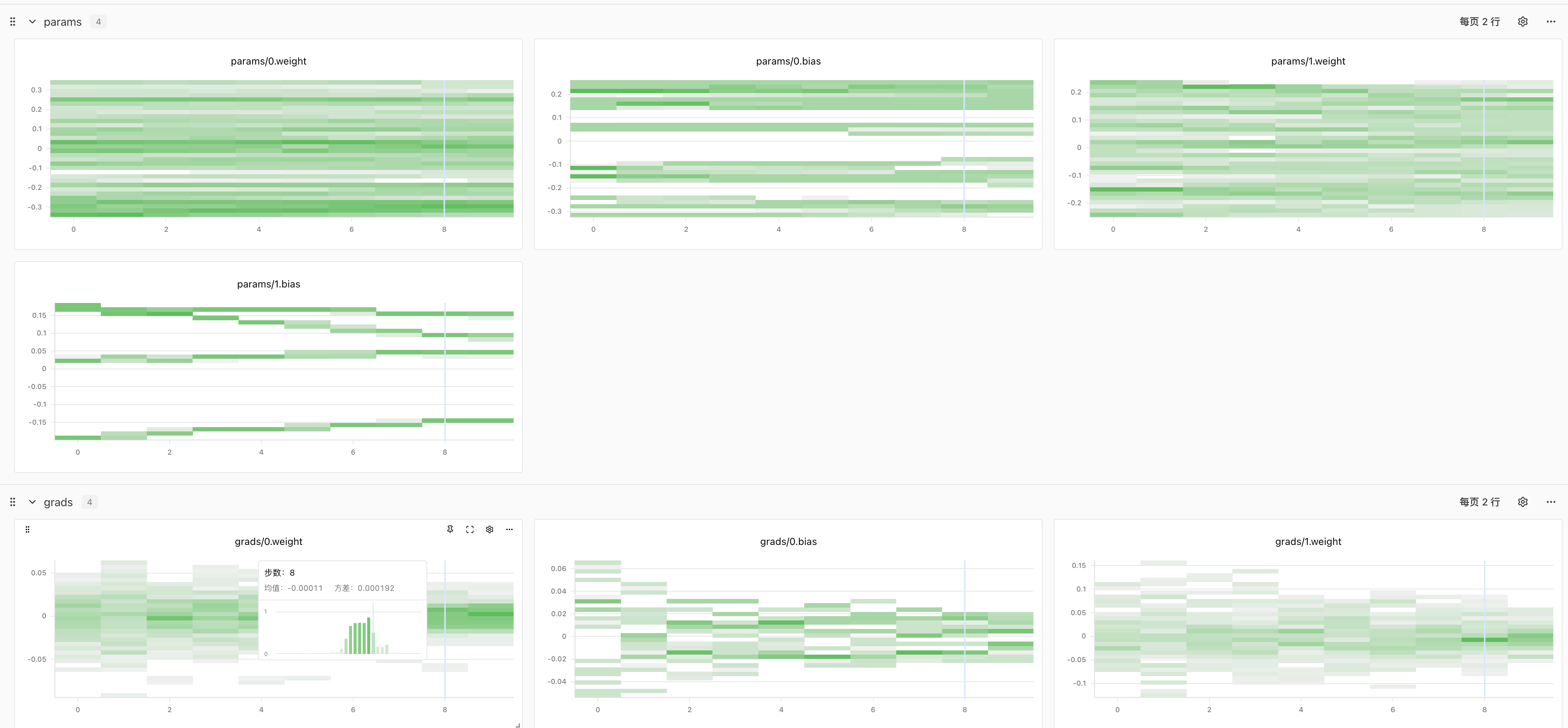
swanlab.Histogram converts a sequence of values into a histogram and works with swanlab.log to track data distributions across steps (such as model weights and gradients):
- From raw data: automatically split into equal-width bins by bin count, or bin by custom edges
- From pre-binned results: directly reuse the output of
numpy.histogram()
Create from Raw Data
When bins is an integer (or omitted, defaulting to 64), equal-width bins are generated from the min/max range of the current samples:
import numpy as np
import swanlab

run = swanlab.init(project="histogram-demo")

rng = np.random.default_rng(42)
for step in range(10):
    samples = rng.normal(loc=step * 0.1, size=1000)
    run.log({"weights": swanlab.Histogram(samples, bins=64)}, step=step)

run.finish()
Each Histogram call computes bin edges independently from that step's sample range. NaN and Inf values are filtered out with a warning; if no finite values remain, a ValueError is raised.
Custom Bin Edges
To keep bin edges fixed across steps or use unequal bin widths, pass a sequence of edges to bins (N bins require N+1 non-decreasing edge values):
import swanlab

run = swanlab.init(project="histogram-demo")

hist = swanlab.Histogram(
    [0.0, 0.5, 1.0, 2.0, 3.0],
    bins=[0.0, 1.0, 3.0],
)

print(hist.values)  # [2, 3]
print(hist.bins)    # [0.0, 1.0, 3.0]

run.log({"weights": hist}, step=0)
run.finish()
All bins are half-open [bins[i], bins[i+1]) except the last bin, which is closed on both ends [bins[-2], bins[-1]]. Values outside the edge range are ignored with a warning.
Create from Pre-binned Results
If you have already computed a histogram with numpy.histogram(), pass (counts, bin_edges) directly via np_histogram:
import numpy as np
import swanlab

run = swanlab.init(project="histogram-demo")

samples = [0.0, 0.5, 1.0, 2.0, 3.0]
counts, bin_edges = np.histogram(samples, bins=[0.0, 1.0, 3.0])
hist = swanlab.Histogram(np_histogram=(counts, bin_edges))

run.log({"weights": hist}, step=0)
run.finish()
len(bin_edges) must equal len(counts) + 1 (with 1–512 bins), and counts must be non-negative integers; probability densities and fractional weighted counts are not supported.
Log PyTorch Tensors
PyTorch Tensors can be passed directly (detach().cpu() is called automatically, supporting GPU tensors, tensors with gradients, and bfloat16). Flatten multidimensional tensors to 1D with .flatten() first:
import torch
import swanlab

run = swanlab.init(project="histogram-demo")

model = torch.nn.Sequential(torch.nn.Linear(8, 16), torch.nn.Linear(16, 4))
optimizer = torch.optim.SGD(model.parameters(), lr=0.1)

for step in range(10):
    loss = model(torch.randn(32, 8)).pow(2).mean()
    optimizer.zero_grad()
    loss.backward()

    histograms = {}
    for name, param in model.named_parameters():
        histograms[f"params/{name}"] = swanlab.Histogram(param.detach().flatten())
        if param.grad is not None:
            histograms[f"grads/{name}"] = swanlab.Histogram(param.grad.detach().flatten())
    run.log(histograms, step=step)

    optimizer.step()

run.finish()
Attributes
A constructed Histogram instance exposes the following attributes:
| Attribute | Type | Description |
|---|---|---|
values | list[int] | Sample counts per bin, of length N. |
bins | list[float] | Bin edge list, of length N+1. |
is_valid | bool | Whether the input passed type and shape validation; invalid instances are skipped during log. |
Only the binned values and bins are stored when logged — raw samples cannot be recovered. Uploaded histograms can be queried via the Open API.
Notes
- Each metric key only accepts a single
Histogramper call and does not support passing a list likeImage(lists are rejected and dropped). Use separate metric keys to log multiple distributions. - For the same metric key at the same
step, only the first record is kept and subsequent records are skipped. A metric's type is fixed on first log — do not mix scalars and histograms under the same key. - Histogram charts always use
stepas the X axis;define_metric(x_axis=...)has no effect on histograms (onlysection_nameandhiddenapply). - Invalid numeric values or lengths (such as a bin count outside
1–512, decreasing bin edges, or omitting bothsequenceandnp_histogram) raiseValueError. Invalid input types or shapes (such as unflattened multidimensional arrays or non-numeric objects) do not interrupt training: the instance is markedis_valid=False, skipped duringlog, and recorded indebug/debug.log.