

Qwen3 Large Model Fine-Tuning in Practice: Medical Reasoning Dialogue


Qwen3 is the latest open-source large language model (LLM) released by Alibaba's Tongyi Lab, which claimed the top spot on open-source LLM leaderboards upon release. Meanwhile, the Qwen series has surpassed LLaMA to become the most popular open-source LLM on HuggingFace.
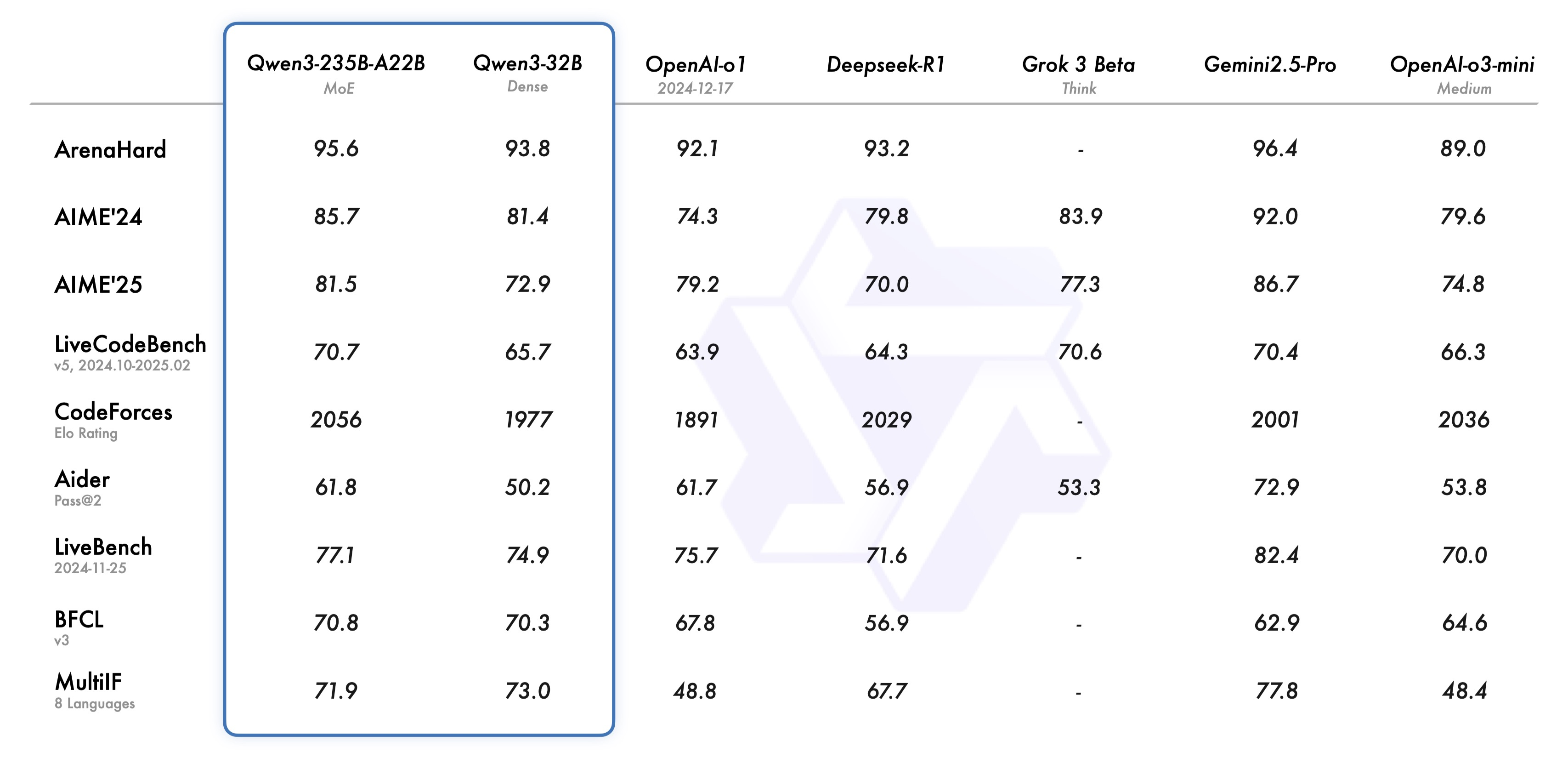
Whether for research or practical applications, Qwen is increasingly becoming one of the best options for developers.
Using Qwen3 as the base model and applying full-parameter fine-tuning to achieve domain-specific conversational capabilities—even supporting DeepSeek R1 / QwQ-style reasoning dialogues—is an introductory task for learning LLM fine-tuning.
In this article, we will fine-tune the Qwen3-1.7b model on the delicate_medical_r1_data dataset, enabling the fine-tuned Qwen3 to provide reasoning-based responses to medical questions. The training utilizes tools like transformers and datasets, with SwanLab for monitoring and evaluating model performance.
Full-parameter fine-tuning requires approximately 32GB of GPU memory. If your GPU memory is insufficient, consider using Qwen3-0.6b or LoRA fine-tuning.
- Code: GitHub (or see Section 5 below)
- Training Logs: qwen3-1.7B-linear - SwanLab (or search "qwen3-sft-medical" in SwanLab Benchmark Community)
- Model: ModelScope
- Dataset: delicate_medical_r1_data
- SwanLab: https://swanlab.cn
Key Concept: What is Full-Parameter Fine-Tuning?
Full-parameter fine-tuning refers to updating and optimizing all parameters of a pre-trained large model, distinguishing it from partial fine-tuning and LoRA fine-tuning.
This method involves updating the entire model weights (including embedding layers, intermediate feature extraction layers, and task-specific adaptation layers) through gradient backpropagation on downstream task data. Compared to partial fine-tuning, full-parameter fine-tuning better leverages the generalization capabilities of pre-trained models while deeply adapting them to specific tasks, typically performing better in scenarios with significant domain shifts or high task complexity.
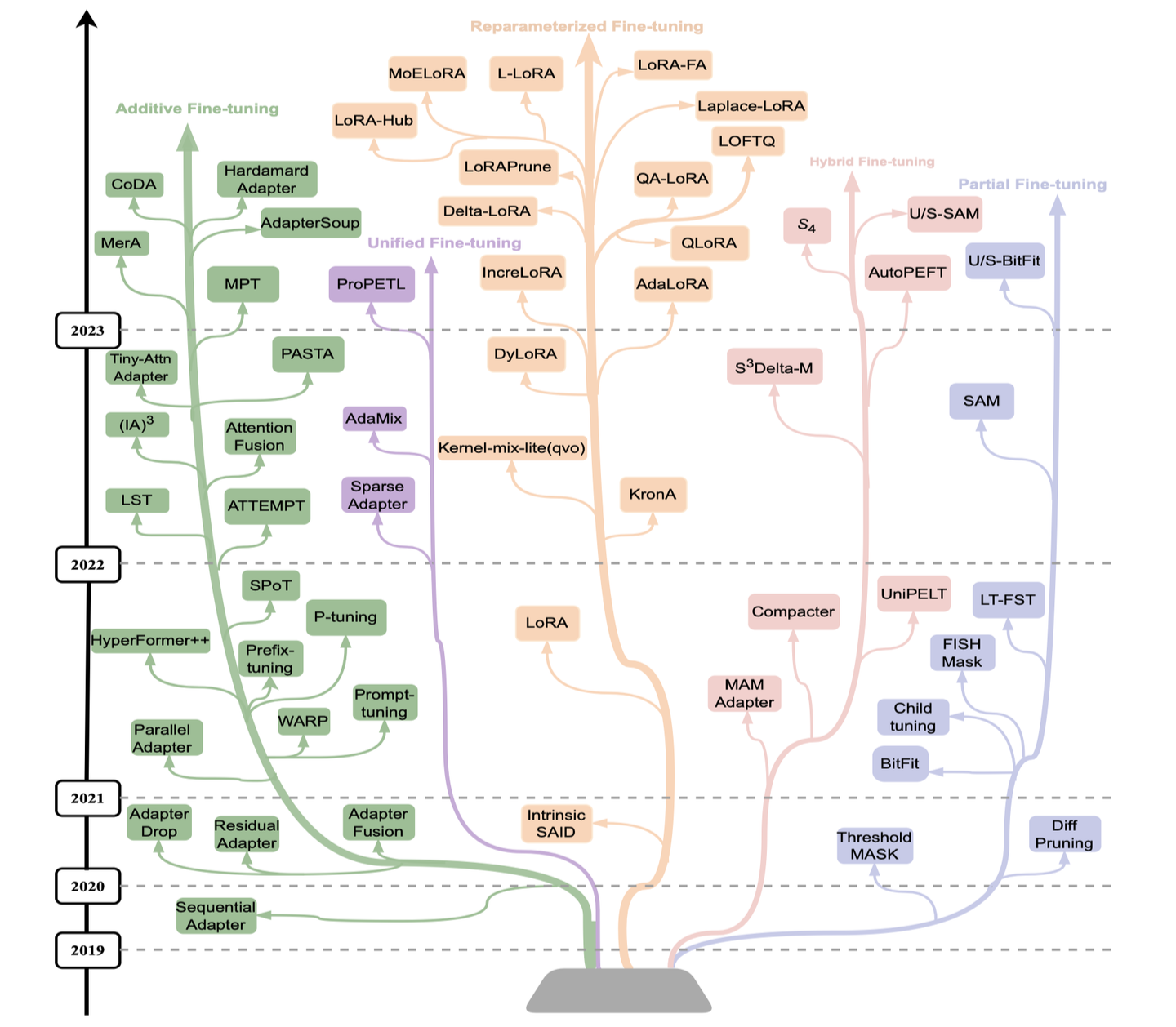
However, full-parameter fine-tuning demands higher computational resources and storage and carries a risk of overfitting (especially on small datasets). In practice, techniques like learning rate scheduling, parameter grouping, or regularization are often applied to mitigate these issues.
Full-parameter fine-tuning is commonly used in high-performance scenarios, such as domain-specific QA or high-precision text generation.
For more fine-tuning techniques, see: https://zhuanlan.zhihu.com/p/682082440
Now, let’s dive into the practical steps:
1. Environment Setup
This tutorial requires Python>=3.8. Ensure Python is installed on your system.
Additionally, you’ll need at least one NVIDIA/Ascend GPU (approximately 32GB memory is recommended).
Install the following Python libraries (ensure PyTorch and CUDA are already installed):
swanlab
modelscope==1.22.0
transformers>=4.50.0
datasets==3.2.0
accelerate
pandas
addict
One-command installation:
pip install swanlab modelscope==1.22.0 "transformers>=4.50.0" datasets==3.2.0 accelerate pandas addictTested with:
modelscope==1.22.0,transformers==4.51.3,datasets==3.2.0,peft==0.11.1,accelerate==1.6.0,swanlab==0.5.7
2. Preparing the Dataset
We use the delicate_medical_r1_data dataset, designed for medical dialogue models.
The dataset contains 2,000+ entries, each with six columns: Instruction, question, think, answer, and metrics:
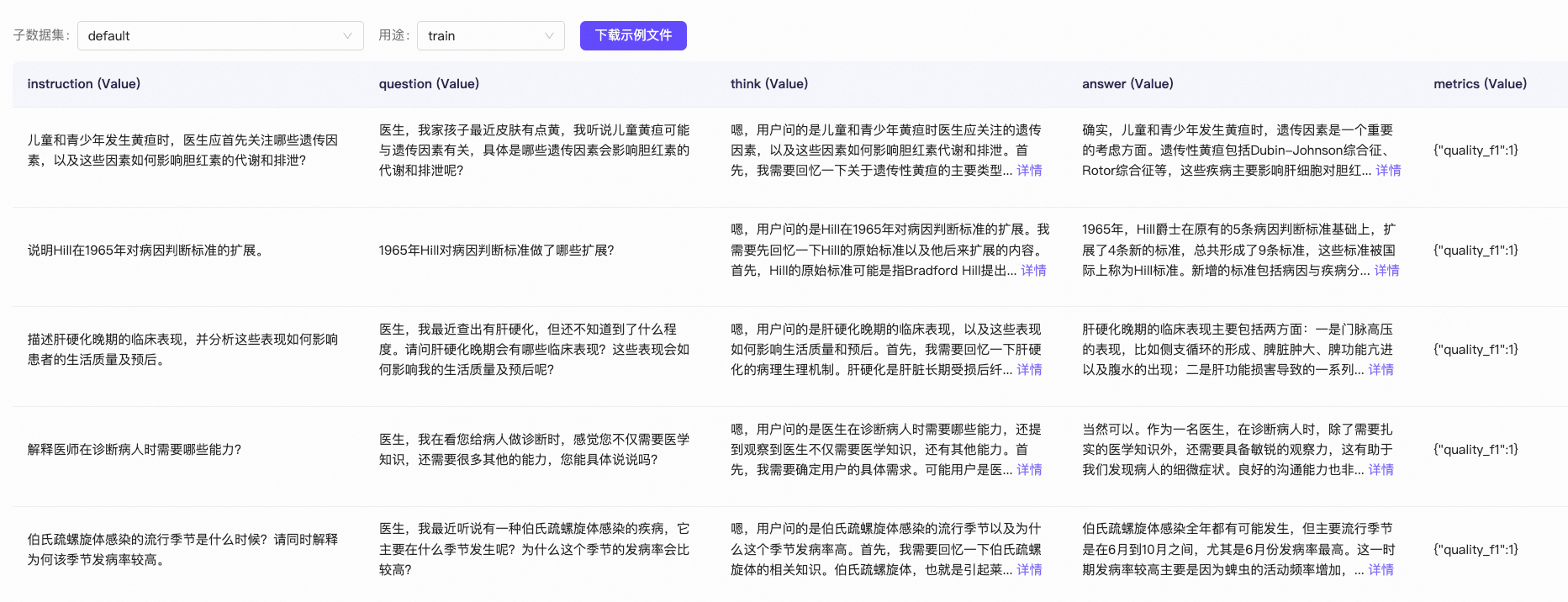
We only use question, think, and answer:
question: The user's input query.think: The model’s reasoning process (similar to DeepSeek R1’s output).answer: The model’s final response.
Our goal is to fine-tune the model to generate a combined think + answer response based on question, with clear visual distinction between reasoning and answers.
A sample data entry:
{
  "question": "My father was just diagnosed with active bleeding. The doctor said immediate action is needed—what should we do?",
  "think": "Hmm, the user’s question is about general measures for active bleeding...",
  "answer": "First, your father needs bed rest. Avoid food intake during active bleeding..."
}
During training, think and answer are formatted as:
<think>
Hmm, the user’s question is about general measures for active bleeding...
</think>

First, your father needs bed rest. Avoid food intake during active bleeding...
Downloading and Formatting the Dataset
Run the following script to preprocess the data:
from modelscope.msdatasets import MsDataset
import json
import random

random.seed(42)

ds = MsDataset.load('krisfu/delicate_medical_r1_data', subset_name='default', split='train')
data_list = list(ds)
random.shuffle(data_list)

split_idx = int(len(data_list) * 0.9)

train_data = data_list[:split_idx]
val_data = data_list[split_idx:]

with open('train.jsonl', 'w', encoding='utf-8') as f:
    for item in train_data:
        json.dump(item, f, ensure_ascii=False)
        f.write('\n')

with open('val.jsonl', 'w', encoding='utf-8') as f:
    for item in val_data:
        json.dump(item, f, ensure_ascii=False)
        f.write('\n')

print(f"Train Set Size: {len(train_data)}")
print(f"Val Set Size: {len(val_data)}")
This generates train.jsonl and val.jsonl.
3. Loading the Model
Download Qwen3-1.7B from ModelScope (faster and more stable in China) and load it via Transformers:
from modelscope import snapshot_download, AutoTokenizer
from transformers import AutoModelForCausalLM

model_dir = snapshot_download("Qwen/Qwen3-1.7B", cache_dir="./", revision="master")

tokenizer = AutoTokenizer.from_pretrained("./Qwen/Qwen3-1.7B", use_fast=False, trust_remote_code=True)
model = AutoModelForCausalLM.from_pretrained("./Qwen/Qwen3-1.7B", device_map="auto", torch_dtype=torch.bfloat16)
4. Configuring Training Visualization
We use SwanLab to monitor training and evaluate model performance.
SwanLab is an open-source, lightweight AI training tracking and visualization tool, often called the "Chinese Weights & Biases + TensorBoard." It supports cloud/offline use and integrates with 40+ frameworks (PyTorch, Transformers, etc.).
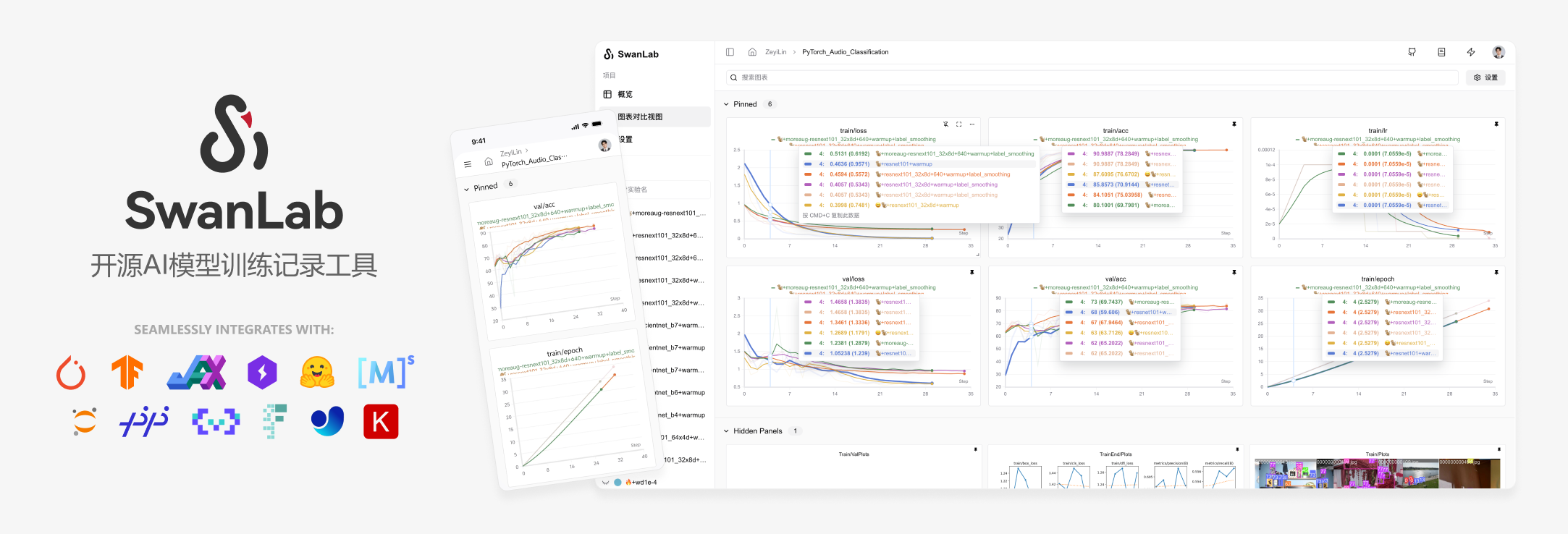
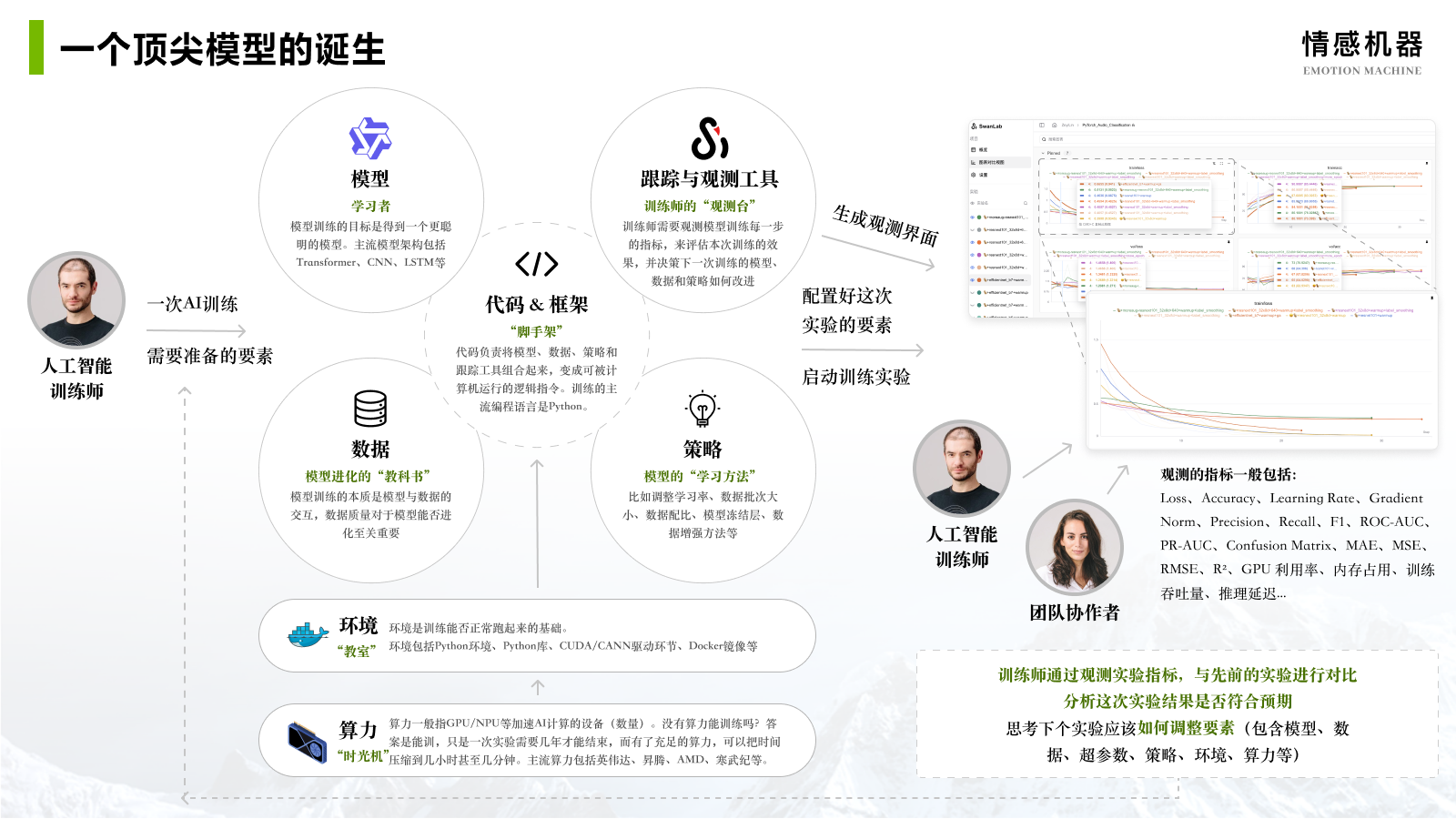
Integration with Transformers:
from transformers import TrainingArguments

args = TrainingArguments(
    ...,
    report_to="swanlab",
    run_name="qwen3-1.7B",
)
First-time users: Register at https://swanlab.cn, copy your API Key, and paste it when prompted:

5. Full Training Code
Directory structure:
|--- train.py
|--- train.jsonl
|--- val.jsonltrain.py:
import json
import pandas as pd
import torch
from datasets import Dataset
from modelscope import snapshot_download, AutoTokenizer
from transformers import AutoModelForCausalLM, TrainingArguments, Trainer, DataCollatorForSeq2Seq
import os
import swanlab

os.environ["SWANLAB_PROJECT"] = "qwen3-sft-medical"
PROMPT = "You are a medical expert. Provide well-reasoned answers to user questions."
MAX_LENGTH = 2048

swanlab.config.update({
    "model": "Qwen/Qwen3-1.7B",
    "prompt": PROMPT,
    "data_max_length": MAX_LENGTH,
})

def dataset_jsonl_transfer(origin_path, new_path):
    """Convert raw dataset to fine-tuning format."""
    messages = []
    with open(origin_path, "r") as file:
        for line in file:
            data = json.loads(line)
            input = data["question"]
            output = f"<think>{data['think']}</think>\n{data['answer']}"
            message = {
                "instruction": PROMPT,
                "input": input,
                "output": output,
            }
            messages.append(message)
    with open(new_path, "w", encoding="utf-8") as file:
        for message in messages:
            file.write(json.dumps(message, ensure_ascii=False) + "\n")

def process_func(example):
    """Preprocess dataset."""
    instruction = tokenizer(
        f"<|im_start|>system\n{PROMPT}<|im_end|>\n<|im_start|>user\n{example['input']}<|im_end|>\n<|im_start|>assistant\n",
        add_special_tokens=False,
    )
    response = tokenizer(f"{example['output']}", add_special_tokens=False)
    input_ids = instruction["input_ids"] + response["input_ids"] + [tokenizer.pad_token_id]
    attention_mask = instruction["attention_mask"] + response["attention_mask"] + [1]
    labels = [-100] * len(instruction["input_ids"]) + response["input_ids"] + [tokenizer.pad_token_id]
    if len(input_ids) > MAX_LENGTH:  # Truncate if needed
        input_ids = input_ids[:MAX_LENGTH]
        attention_mask = attention_mask[:MAX_LENGTH]
        labels = labels[:MAX_LENGTH]
    return {"input_ids": input_ids, "attention_mask": attention_mask, "labels": labels}

# Load model
model_dir = snapshot_download("Qwen/Qwen3-1.7B", cache_dir="./", revision="master")
tokenizer = AutoTokenizer.from_pretrained(model_dir, use_fast=False, trust_remote_code=True)
model = AutoModelForCausalLM.from_pretrained(model_dir, device_map="auto", torch_dtype=torch.bfloat16)
model.enable_input_require_grads()  # Enable gradient checkpointing

# Load and preprocess data
dataset_jsonl_transfer("train.jsonl", "train_format.jsonl")
dataset_jsonl_transfer("val.jsonl", "val_format.jsonl")

train_df = pd.read_json("train_format.jsonl", lines=True)
train_ds = Dataset.from_pandas(train_df)
train_dataset = train_ds.map(process_func, remove_columns=train_ds.column_names)

eval_df = pd.read_json("val_format.jsonl", lines=True)
eval_ds = Dataset.from_pandas(eval_df)
eval_dataset = eval_ds.map(process_func, remove_columns=eval_ds.column_names)

# Training arguments
args = TrainingArguments(
    output_dir="./output/Qwen3-1.7B",
    per_device_train_batch_size=1,
    gradient_accumulation_steps=4,
    num_train_epochs=2,
    learning_rate=1e-4,
    report_to="swanlab",
    run_name="qwen3-1.7B",
)

trainer = Trainer(
    model=model,
    args=args,
    train_dataset=train_dataset,
    eval_dataset=eval_dataset,
    data_collator=DataCollatorForSeq2Seq(tokenizer=tokenizer, padding=True),
)

trainer.train()
Training starts when the progress bar appears:
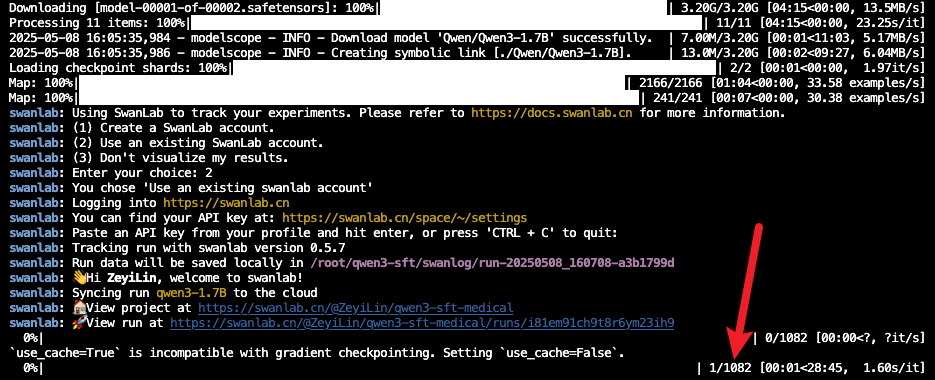
6. Training Results
View logs on SwanLab:
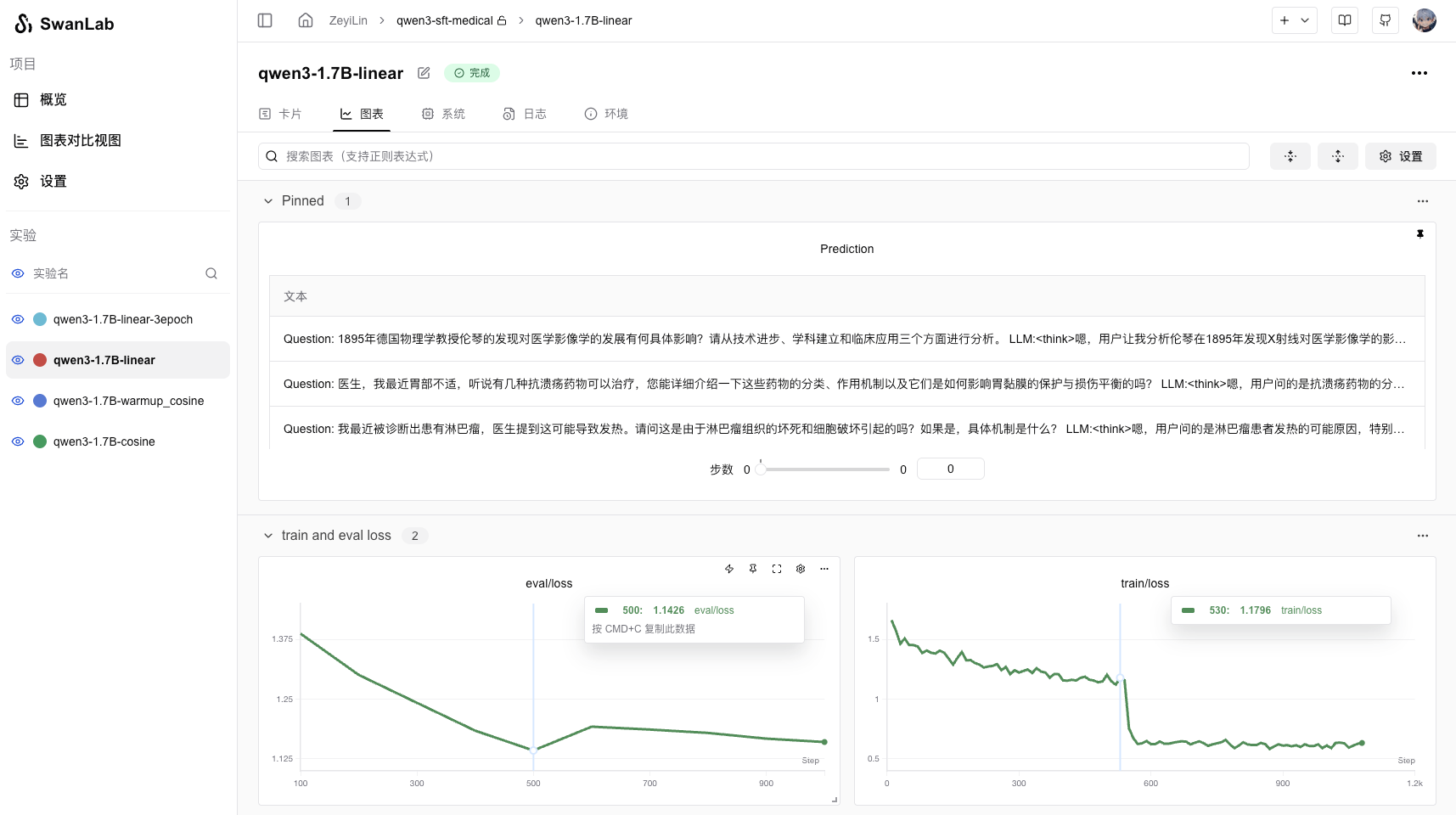
Key metrics: train_loss and eval_loss, plus 3 sample model outputs.
Plotting train_loss (blue) vs. eval_loss (green) reveals overfitting:
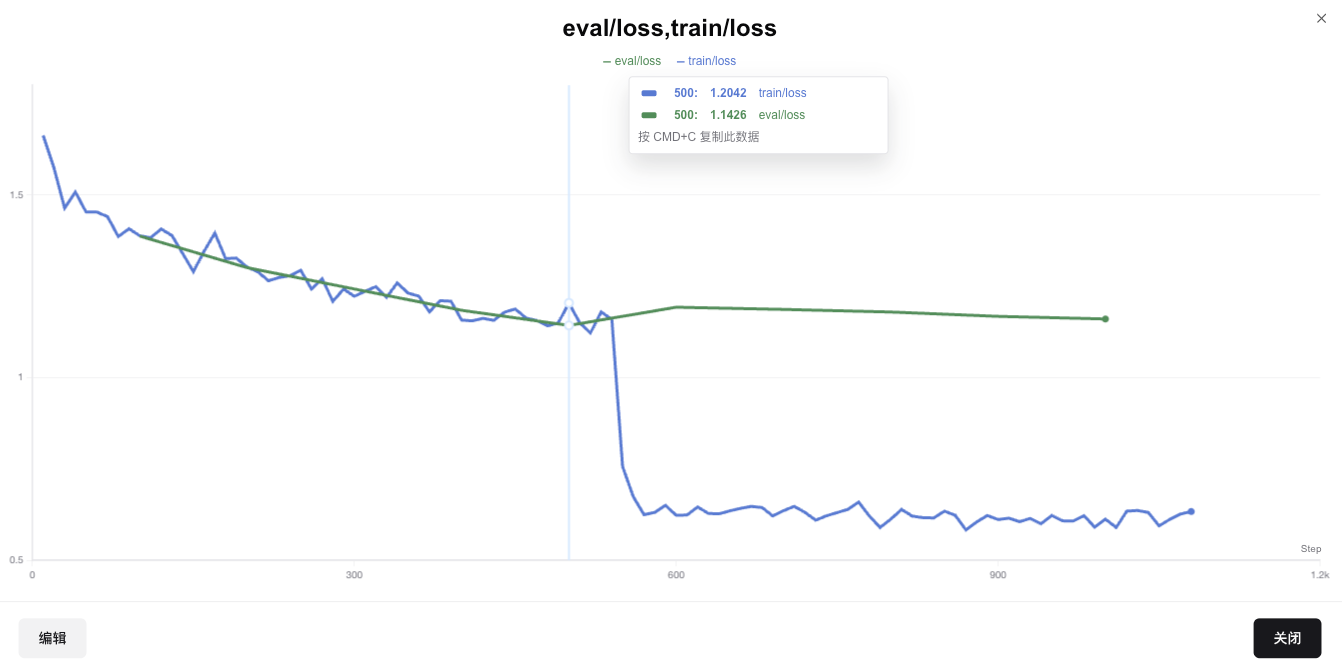
eval_loss rises after the first epoch, suggesting 1 epoch is sufficient for this dataset size.
Sample Outputs:
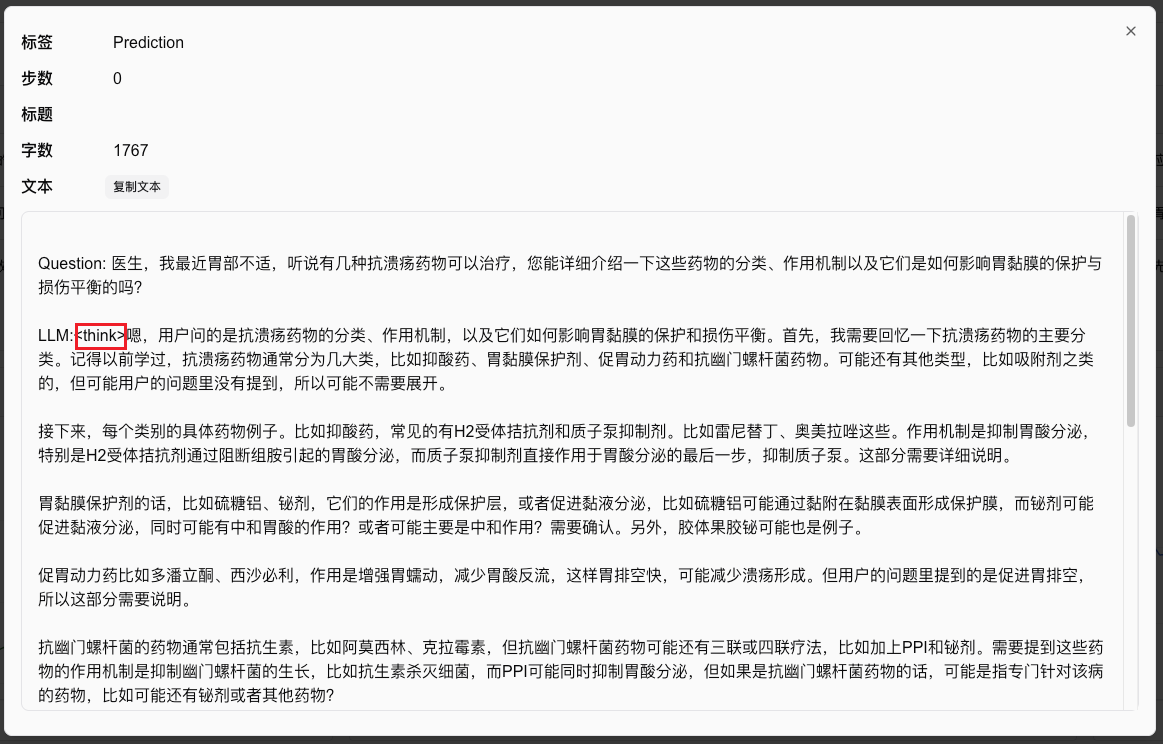
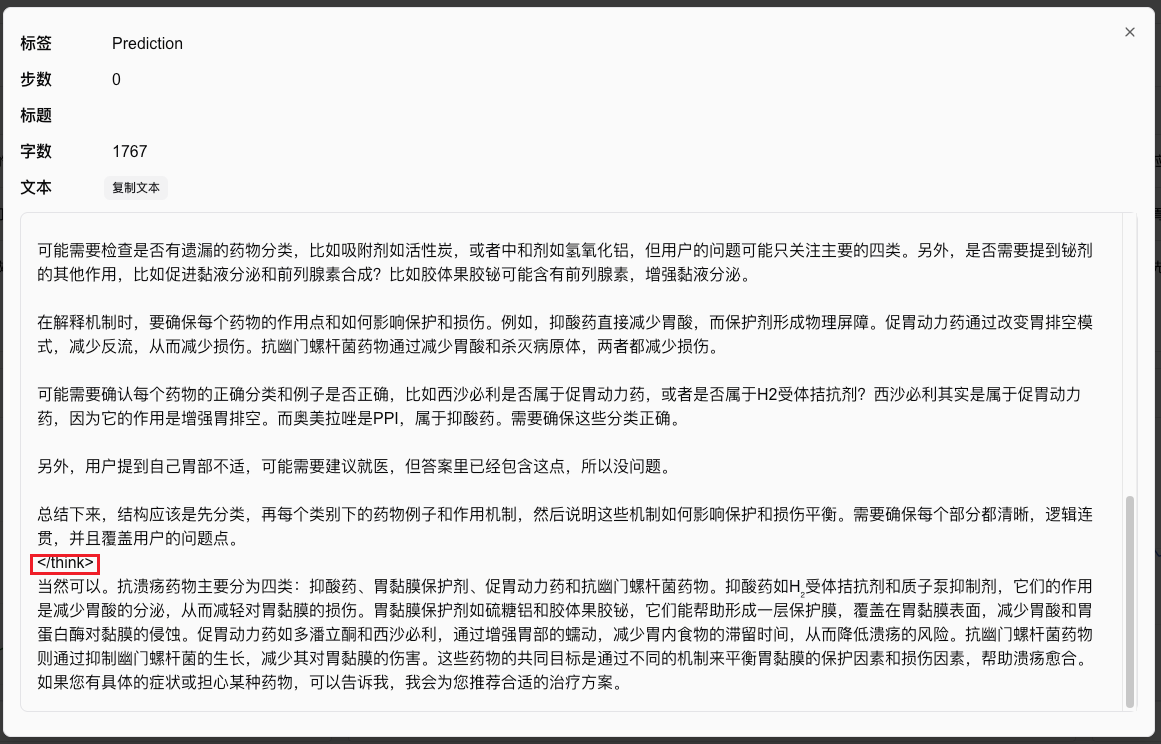
The fine-tuned model now provides structured reasoning (<think>) before answers. Example:
<think>
[Reasoning about ulcer medications...]
</think>

The main categories of anti-ulcer drugs are... [Detailed answer follows].
7. Inference with the Fine-Tuned Model
The model is saved in ./output/Qwen3. Inference script:
import torch
from transformers import AutoModelForCausalLM, AutoTokenizer

def predict(messages, model, tokenizer):
    text = tokenizer.apply_chat_template(messages, tokenize=False, add_generation_prompt=True)
    inputs = tokenizer([text], return_tensors="pt").to("cuda")
    outputs = model.generate(**inputs, max_new_tokens=2048)
    return tokenizer.decode(outputs[0][len(inputs.input_ids[0]):], skip_special_tokens=True)

tokenizer = AutoTokenizer.from_pretrained("./output/Qwen3-1.7B/checkpoint-1000", trust_remote_code=True)
model = AutoModelForCausalLM.from_pretrained("./output/Qwen3-1.7B/checkpoint-1000", device_map="auto", torch_dtype=torch.bfloat16)

test_question = {
    "instruction": "You are a medical expert. Provide well-reasoned answers.",
    "input": "Doctor, I was recently diagnosed with diabetes. How should I choose carbohydrates?"
}

messages = [
    {"role": "system", "content": test_question["instruction"]},
    {"role": "user", "content": test_question["input"]}
]

print(predict(messages, model, tokenizer))
References
- Code: GitHub
- Training Logs: SwanLab
- Model: ModelScope
- Dataset: delicate_medical_r1_data
- SwanLab: https://swanlab.cn